Free Shipping on Domestic Orders $75+

This translation was generated by a machine and has not been reviewed by a person yet. Speak this language? Review it.

Thomson DK 700 T Belt Replacement

Views: 666

View statistics:

Past 24 Hours:
5
Past 7 Days:
25
Past 30 Days:
79
All Time:
666
Comments: 0

No one has left comments on this guide. Will you be first?

Go to guide comments
Completed: 0

No one has marked this guide "completed." Will you be the first?

Favorites: 0

No one has favorited (and subscribed to) this guide. Will you be the first?

Time Required: 2 - 4 hours
Difficulty: Moderate
Featured Guide

This guide has been found to be exceptionally cool by the iFixit staff.

Community-Contributed Guide

An awesome member of our community made this guide. It was not created by iFixit staff.

Thomson DK 700 T Belt Replacement

Introduction

Go to step 1 ↓

This guide shows you how to replace the two belts in this cassette deck that is over 40 years old. When these rubber belts degrade, the tape transport can become irregular or stop for no apparent reason. Finding equivalent new belts and replacing them is a relatively simple operation.

What you need

Parts

Tools

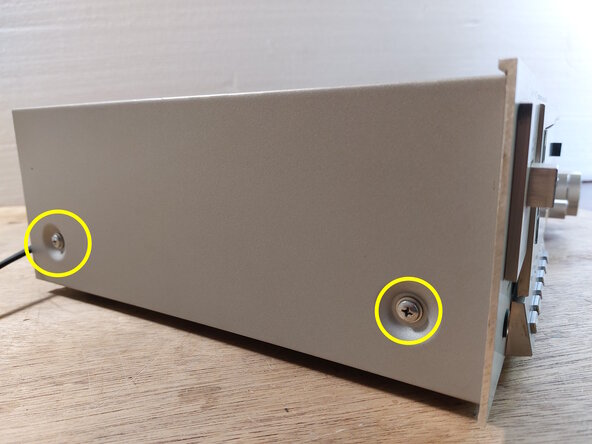
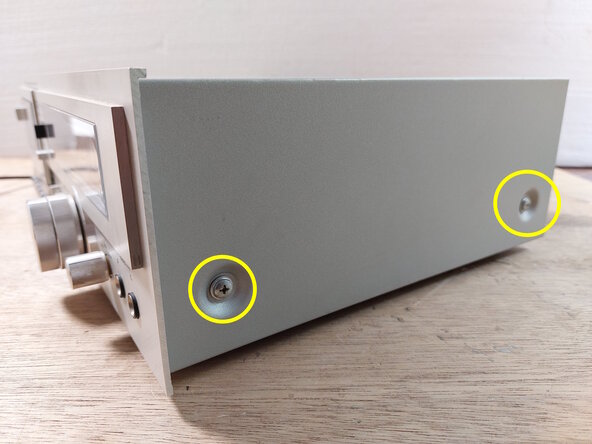
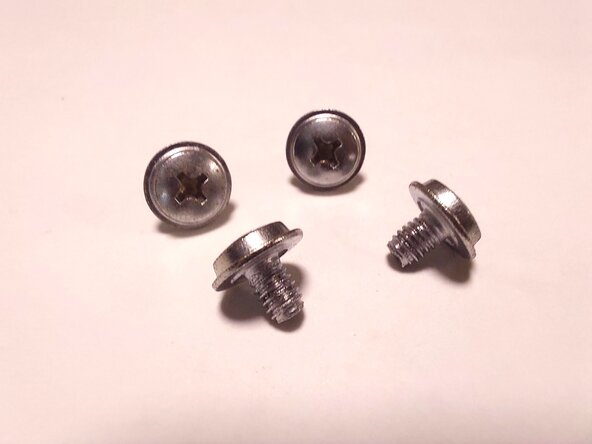
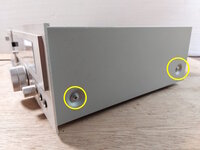
    1. Thomson DK 700 T Belt Replacement, Removal of the cover screws: step 1, image 1 of 3 Thomson DK 700 T Belt Replacement, Removal of the cover screws: step 1, image 2 of 3 Thomson DK 700 T Belt Replacement, Removal of the cover screws: step 1, image 3 of 3
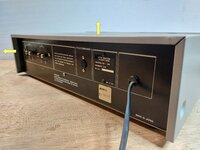
      • Attention, for your safety, unplug the device before you begin.

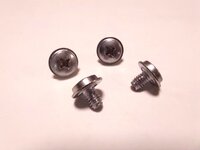
      • Using a Phillips PH2 screwdriver, remove the 4 screws located on the sides of the cover.

      • 4 M4 x 5mm screws with PH2 head.

      Ask FixBot

      Add Comment

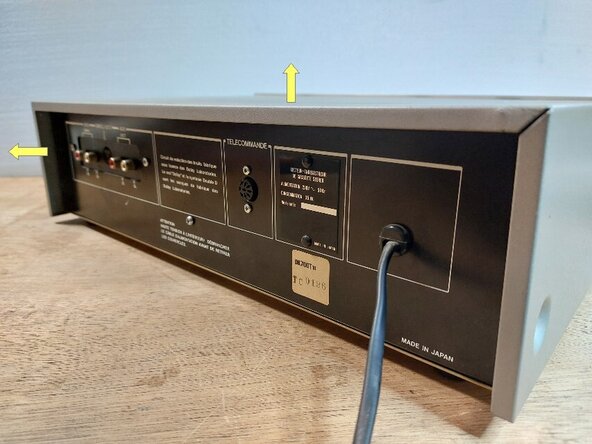
    2. Thomson DK 700 T Belt Replacement, Removing the cover: step 2, image 1 of 2 Thomson DK 700 T Belt Replacement, Removing the cover: step 2, image 2 of 2
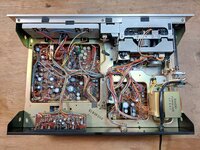
      • With the 4 screws removed, slide the cover toward the back by about 1 to 2 cm, then lift it up.

      • The device is open.

      Ask FixBot

      Add Comment

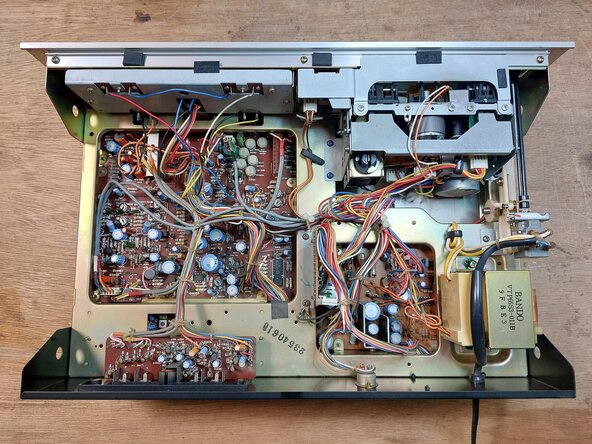
    3. Thomson DK 700 T Belt Replacement, Identifying the main components: step 3, image 1 of 1
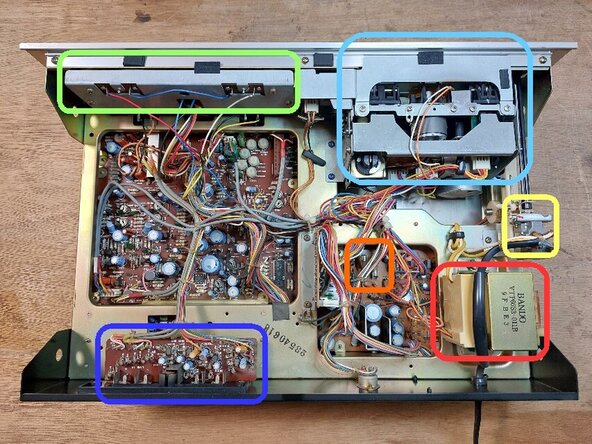
      • Here are the main components that may require replacement, maintenance, or repair:

      • The power switch (220V).

      • The power transformer.

      • The power fuses (2 glass 1.6 A 5 x 20 mm fuses).

      • Analog VU meter block.

      • Cassette player/recorder block.

      • Auxiliary input/output board and sockets.

      Ask FixBot

      Add Comment

    1. Thomson DK 700 T Belt Replacement, Disconnecting the cassette player/recorder cables: step 4, image 1 of 3 Thomson DK 700 T Belt Replacement, Disconnecting the cassette player/recorder cables: step 4, image 2 of 3 Thomson DK 700 T Belt Replacement, Disconnecting the cassette player/recorder cables: step 4, image 3 of 3
      • Disconnect the three white connectors located on the back of the cassette player/recorder.

      • Although the connectors have a snap fit, they disconnect quite easily by pulling with your fingers, or by using bent-nose pliers.

      • For the one on the bottom left, bent-nose pliers make the task easier.

      Ask FixBot

      Add Comment

    2. Thomson DK 700 T Belt Replacement: step 5, image 1 of 3 Thomson DK 700 T Belt Replacement: step 5, image 2 of 3 Thomson DK 700 T Belt Replacement: step 5, image 3 of 3
      Tool used on this step:
      Flush Cutter C.H.P. CHP-170
      $6.99
      Buy
      • Disconnect the two recording/playback head and erase head connectors with your fingers or bent nose tweezers.

      • Using flush cutters, cut the cable ties of the cables you just disconnected.

      Ask FixBot

      Add Comment

    3. Thomson DK 700 T Belt Replacement, Automatic stop board removal: step 6, image 1 of 2 Thomson DK 700 T Belt Replacement, Automatic stop board removal: step 6, image 2 of 2
      • Remove the PH1 Phillips screw securing the automatic stop board.

      • This board is quite fragile and is only secured to the reader/recorder assembly by one screw. It is preferable to remove it rather than unplug its connector. This way, it will remain in the device's frame when the reader/recorder assembly is removed.

      • Remove the board and move it out of the way of the reader/recorder assembly.

      Ask FixBot

      Add Comment

    4. Thomson DK 700 T Belt Replacement, Power button removal: step 7, image 1 of 2 Thomson DK 700 T Belt Replacement, Power button removal: step 7, image 2 of 2
      • Remove the (white) snap fit from the button pin by prying it with a sharp tool inserted into the accessible hole. The snap fit comes off very easily. Using a tool is not strictly necessary.

      • Remove the button and its pin by sliding it out of its housing on the front of the device.

      • The fastener screws for the player/recorder assembly will now be more easily accessible.

      Ask FixBot

      Add Comment

    5. Thomson DK 700 T Belt Replacement, Detaching the cassette door flap brake: step 8, image 1 of 3 Thomson DK 700 T Belt Replacement, Detaching the cassette door flap brake: step 8, image 2 of 3 Thomson DK 700 T Belt Replacement, Detaching the cassette door flap brake: step 8, image 3 of 3
      • Using a size 1.2 flathead screwdriver, remove the circlip connecting the cassette door flap to its opening brake.

      • To avoid losing the circlip, which can "fly off," press your fingers over it while removing it from the shaft, or place a magnet against it.

      Ask FixBot

      Add Comment

    6. Thomson DK 700 T Belt Replacement, Removal of the cassette door front panel: step 9, image 1 of 3 Thomson DK 700 T Belt Replacement, Removal of the cassette door front panel: step 9, image 2 of 3 Thomson DK 700 T Belt Replacement, Removal of the cassette door front panel: step 9, image 3 of 3
      • Open the cassette door.

      • Unclip the front panel of the door by lifting it with your index fingers, using your thumbs to provide leverage on top of the door.

      • The door unclips easily.

      Ask FixBot

      Add Comment

    7. Thomson DK 700 T Belt Replacement, Removal of the drive assembly fastener screws: step 10, image 1 of 3 Thomson DK 700 T Belt Replacement, Removal of the drive assembly fastener screws: step 10, image 2 of 3 Thomson DK 700 T Belt Replacement, Removal of the drive assembly fastener screws: step 10, image 3 of 3
      • Remove the five Phillips PH2 screws.

      • Their heads are bluish. The middle screw is located under a small piece of adhesive felt.

      Ask FixBot

      Add Comment

    8. Thomson DK 700 T Belt Replacement, Removing the tape drive assembly: step 11, image 1 of 3 Thomson DK 700 T Belt Replacement, Removing the tape drive assembly: step 11, image 2 of 3 Thomson DK 700 T Belt Replacement, Removing the tape drive assembly: step 11, image 3 of 3
      • Spread the white connectors toward the back and place the three gray read/write and erase head cables toward the front of the device.

      • Remove the tape drive assembly from the frame by pulling it back one to two centimeters, then lifting it from the rear.

      Ask FixBot

      Add Comment

    9. Thomson DK 700 T Belt Replacement, Views of the player/recorder assembly: step 12, image 1 of 3 Thomson DK 700 T Belt Replacement, Views of the player/recorder assembly: step 12, image 2 of 3 Thomson DK 700 T Belt Replacement, Views of the player/recorder assembly: step 12, image 3 of 3
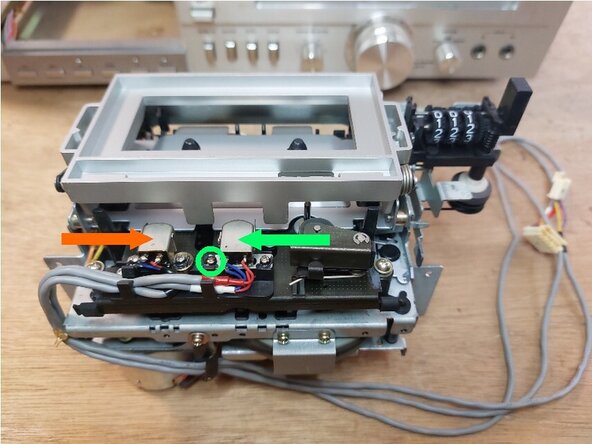
      • Front view.

      • Top view. Read/record head. If its removal is not necessary, do not do it, because the left screw is used to adjust the azimuth of the head relative to the tape to obtain the maximum amplitude signal on both the left and right channels.

      • Top view. Erase head.

      • Rear view. Counter drive belt.

      • Rear view. Flywheel drive belt.

      Ask FixBot

      Add Comment

    10. Thomson DK 700 T Belt Replacement, Cassette door flap removal: step 13, image 1 of 3 Thomson DK 700 T Belt Replacement, Cassette door flap removal: step 13, image 2 of 3 Thomson DK 700 T Belt Replacement, Cassette door flap removal: step 13, image 3 of 3
      • Open the cassette door flap by pressing the release lever with your thumb, while holding it with your index finger to prevent it from opening too abruptly.

      • Remove the two PH1 Phillips screws from the plate located on the left side of the cassette door flap.

      Ask FixBot

      Add Comment

    11. Thomson DK 700 T Belt Replacement: step 14, image 1 of 3 Thomson DK 700 T Belt Replacement: step 14, image 2 of 3 Thomson DK 700 T Belt Replacement: step 14, image 3 of 3
      • Remove the left side plate by sliding it downward and to the right.

      • A small return hairpin spring comes off with the plate. This spring is fragile. Do not forget it during reassembly.

      • Remove the cassette door flap by disengaging it from the pin on the right side plate.

      Ask FixBot

      Add Comment

    12. Thomson DK 700 T Belt Replacement, Removing the mobile deck: step 15, image 1 of 3 Thomson DK 700 T Belt Replacement, Removing the mobile deck: step 15, image 2 of 3 Thomson DK 700 T Belt Replacement, Removing the mobile deck: step 15, image 3 of 3
      • Remove the four Phillips PH1 screws from the mobile deck guides (deck with the two heads and the pinch roller).

      • Gently lift the deck.

      • Be careful, the deck is still attached to the player/recorder frame by its return spring.

      • Unhook the spring from the frame and place the deck next to the frame.

      Ask FixBot

      Add Comment

    13. Thomson DK 700 T Belt Replacement, Removing the counter belt: step 16, image 1 of 3 Thomson DK 700 T Belt Replacement, Removing the counter belt: step 16, image 2 of 3 Thomson DK 700 T Belt Replacement, Removing the counter belt: step 16, image 3 of 3
      • Remove the belt from the counter drive pulley and the take-up reel pulley.

      • Counter pulley.

      • Take-up reel (it receives the magnetic tape from the cassette after playback, recording, or erasure by the heads).

      • The counter drive belt has a 1 mm x 1 mm square cross-section and a diameter of 60 mm. Its total length is 188 mm and its folded length is 94 mm.

      • Before installing the new belt, clean and degrease both pulleys with high-concentration isopropyl alcohol (over 90%).

      Ask FixBot

      Add Comment

    14. Thomson DK 700 T Belt Replacement, Flywheel belt removal: step 17, image 1 of 3 Thomson DK 700 T Belt Replacement, Flywheel belt removal: step 17, image 2 of 3 Thomson DK 700 T Belt Replacement, Flywheel belt removal: step 17, image 3 of 3
      • Remove the two PH1 Phillips screws from the bracket located under the drive/recorder assembly, then remove the bracket.

      • Remove the two PH1 Phillips screws located on top of the plate that holds the flywheel in place (with the adjustable bearing).

      • Remove the PH1 Phillips screw located on the side.

      Ask FixBot

      Add Comment

    15. Thomson DK 700 T Belt Replacement: step 18, image 1 of 3 Thomson DK 700 T Belt Replacement: step 18, image 2 of 3 Thomson DK 700 T Belt Replacement: step 18, image 3 of 3
      • Remove the belt from the motor pulley.

      • Remove the PH1 Phillips screw securing the motor locking tab and remove the tab.

      • Rotate the motor counter-clockwise, remove it from its housing, then slightly lift the plate to access the belt on the flywheel side.

      Ask FixBot

      Add Comment

    16. Thomson DK 700 T Belt Replacement: step 19, image 1 of 2 Thomson DK 700 T Belt Replacement: step 19, image 2 of 2
      • Remove the belt.

      • This is a flat belt with a 4 mm x 1 mm cross-section and an 86 mm diameter. Its total length is 270 mm and its folded length is 135 mm.

      • Before installing the new belt, clean and degrease the motor pulley with high-concentration isopropyl alcohol (over 90%).

      Ask FixBot

      Add Comment

Conclusion

To reassemble your device, follow the instructions in reverse order.

Cancel: I did not complete this guide.

Ecuval

Member since: 06/02/25

2,796 Reputation

12 Guides authored

0 Guide Comments

Add Comment

View Statistics:

Past 24 Hours: 5

Past 7 Days: 25

Past 30 Days: 79

All Time: 666