Free Shipping on Domestic Orders $75+

Thomas and Friends TrackMaster Thomas Battery Replacement

What you need

  1. Thomas and Friends TrackMaster Thomas Battery Replacement, Flip the engine and unscrew: step 1, image 1 of 2 Thomas and Friends TrackMaster Thomas Battery Replacement, Flip the engine and unscrew: step 1, image 2 of 2
    • Flip the engine upside down, where the battery compartment can be accessed. Make sure to unscrew the Phillips screw; do not unscrew the triangular screws as they will not come off.

    Ask FixBot

    Add Comment

  2. Thomas and Friends TrackMaster Thomas Battery Replacement, Pull out the shell: step 2, image 1 of 1
    • Pull the shell of the engine out of the chassis. Look at the black tab on the back of the engine. In order to put it back on, re-align the shell with where the black tab is, otherwise it won't fit properly.

    Ask FixBot

    Add Comment

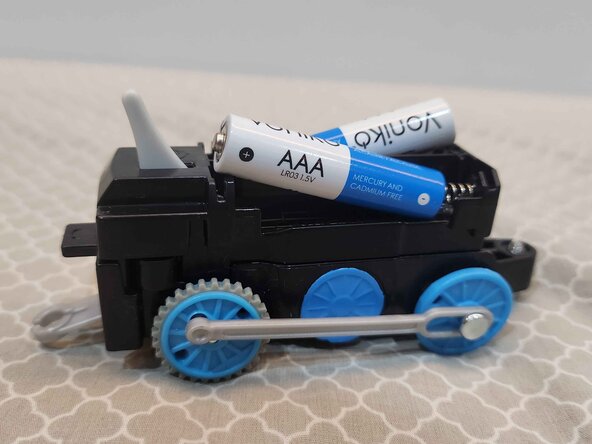
  3. Thomas and Friends TrackMaster Thomas Battery Replacement, Remove and replace batteries: step 3, image 1 of 3 Thomas and Friends TrackMaster Thomas Battery Replacement, Remove and replace batteries: step 3, image 2 of 3 Thomas and Friends TrackMaster Thomas Battery Replacement, Remove and replace batteries: step 3, image 3 of 3
    • Pull out the original, dead/slow batteries and replace them with a new one. Remember to put in the new batteries as shown in the photo, as putting them backwards will simply cause the train to not work.

    Ask FixBot

    Add Comment

  4. Thomas and Friends TrackMaster Thomas Battery Replacement, Put the shell back on: step 4, image 1 of 3 Thomas and Friends TrackMaster Thomas Battery Replacement, Put the shell back on: step 4, image 2 of 3 Thomas and Friends TrackMaster Thomas Battery Replacement, Put the shell back on: step 4, image 3 of 3
    • Put the shell back on by aligning it with the tab at the back of the chassis, then lower it until it's flat. Rotate the Phillips screw back in counter-clockwise (to the right). After this guide, your train is fast and ready again!

    Ask FixBot

    Add Comment

Conclusion

To reassemble your device, follow these instructions in reverse order.

Cancel: I did not complete this guide.

Gabriel Pennington

Member since: 05/01/26

26 Reputation

1 Guide authored

0 Guide Comments

Add Comment

View Statistics:

Past 24 Hours: 5

Past 7 Days: 8

Past 30 Days: 35

All Time: 58