Free Shipping on Domestic Orders $75+

ThinkPad Yoga 12 Battery Replacement

What you need

    1. ThinkPad Yoga 12 Battery Replacement, Screws: step 1, image 1 of 3 ThinkPad Yoga 12 Battery Replacement, Screws: step 1, image 2 of 3 ThinkPad Yoga 12 Battery Replacement, Screws: step 1, image 3 of 3
      • Remove the ten Phillips screws using a Philips 00 screwdriver

      Ask FixBot

      Add Comment

    2. ThinkPad Yoga 12 Battery Replacement, Prying: step 2, image 1 of 2 ThinkPad Yoga 12 Battery Replacement, Prying: step 2, image 2 of 2
      • Pry up the case carefully using a spudger.

      • Make sure to not push the spudger in too far, as this could result in internal damage

      Ask FixBot

      Add Comment

    3. ThinkPad Yoga 12 Battery Replacement, Lift off cover: step 3, image 1 of 1
      • Lift off the cover, and you're done!

      Ask FixBot

      Add Comment

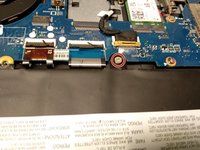
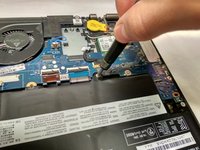
    1. ThinkPad Yoga 12 Battery Replacement, Removing the screw: step 4, image 1 of 2 ThinkPad Yoga 12 Battery Replacement, Removing the screw: step 4, image 2 of 2
      • Remove the one and only Phillips screw with a Phillips 0 screwdriver.

      Ask FixBot

      Add Comment

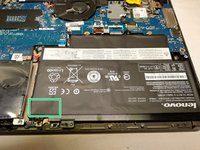
    2. ThinkPad Yoga 12 Battery Replacement, Lift: step 5, image 1 of 2 ThinkPad Yoga 12 Battery Replacement, Lift: step 5, image 2 of 2
      • Carefully lift the battery. There is a small bit of adhesive underneath the green.

      • Make sure to not bend the battery! This can result in a violent explosion with flames and shrapnel!

      Ask FixBot

      Add Comment

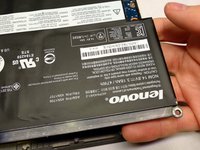
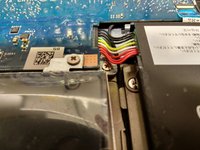
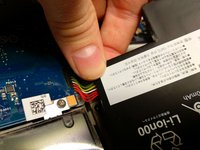
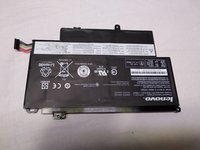
    3. ThinkPad Yoga 12 Battery Replacement, Connecter: step 6, image 1 of 3 ThinkPad Yoga 12 Battery Replacement, Connecter: step 6, image 2 of 3 ThinkPad Yoga 12 Battery Replacement, Connecter: step 6, image 3 of 3
      • Carefully pull the connector out from underneath the logic board to remove the battery.

      Ask FixBot

      Add Comment

Conclusion

To reassemble your device, follow these instructions in reverse order.

Cancel: I did not complete this guide.

9 other people completed this guide.

[deleted]

Member since: 03/18/18

1,338 Reputation

3 Guides authored

1 Guide Comment

These directions (and those for replacing the SSD) were very helpful. Everything worked well for about a week after which time the battery started having charging problems (again). The computer will start to charge, get to ~25% at which point the machine reports that it’s charging, but doesn’t get beyond ~25%. “Troubleshooting” in Win 10 doesn’t reveal any troubles to shoot. I am now trying to figure out whether the problem is with the new (supposedly Lenovo-brand) battery or perhaps the power cord. Any suggestions?

ellamama - Reply Share

Add Comment

View Statistics:

Past 24 Hours: 2

Past 7 Days: 19

Past 30 Days: 72

All Time: 7,593