Free Shipping on Domestic Orders $75+

The Sharper Image Literati Tablet Screen Replacement

What you need

  1. The Sharper Image Literati Tablet Screen Replacement, Battery: step 1, image 1 of 1
    • Wedge plastic spudger tool between the back panel and the body of device.

    • Pry apart the back panel and the device.

    Ask FixBot

    Add Comment

  2. The Sharper Image Literati Tablet Screen Replacement: step 2, image 1 of 1
    • Desolder the battery wires from the circuit board.

    Ask FixBot

    Add Comment

  3. The Sharper Image Literati Tablet Screen Replacement: step 3, image 1 of 1
    • Warm the battery with a hair dryer.

    • Be carful not to over-heat the battery, this could cause the battery to ignite.

    Ask FixBot

    Add Comment

  4. The Sharper Image Literati Tablet Screen Replacement: step 4, image 1 of 1
    Tool used on this step:
    Plastic Cards
    $2.99
    Buy
    • Gently wedge a spudger or thin plastic card between the battery and the body of device. Work the spudger or card along the length of the battery to free it from the adhesive.

    • Do not bend or puncture the battery. Work slowly and carefully.

    Ask FixBot

    Add Comment

  5. The Sharper Image Literati Tablet Screen Replacement, SD Port: step 5, image 1 of 1
    • Use a Phillips #00 screwdriver to remove the fifteen 4mm screws from the silver peripheral edging.

    Ask FixBot

    Add Comment

  6. The Sharper Image Literati Tablet Screen Replacement: step 6, image 1 of 1
    • Use a Phillips #00 screwdriver to remove three 4 mm screws from the circuit board containing the headphone jack and power jack.

    Ask FixBot

    Add Comment

  7. The Sharper Image Literati Tablet Screen Replacement: step 7, image 1 of 1
    • Remove the circuit board.

    Ask FixBot

    Add Comment

  8. The Sharper Image Literati Tablet Screen Replacement: step 8, image 1 of 1
    • Unclip ZIF clip from the chip and unplug ribbon cable.

    Ask FixBot

    Add Comment

  9. The Sharper Image Literati Tablet Screen Replacement: step 9, image 1 of 1
    • Detach the peripheral edge with plastic wedge.

    • This may require a little hard pulling.

    Ask FixBot

    Add Comment

  10. The Sharper Image Literati Tablet Screen Replacement: step 10, image 1 of 1
    • Remove peripheral silver edge.

    Ask FixBot

    Add Comment

  11. The Sharper Image Literati Tablet Screen Replacement: step 11, image 1 of 1
    • Remove screws from the large metal shielding.

    Ask FixBot

    Add Comment

  12. The Sharper Image Literati Tablet Screen Replacement: step 12, image 1 of 1
    • Remove the silver backing plate and the adhered SD port chip.

    Ask FixBot

    Add Comment

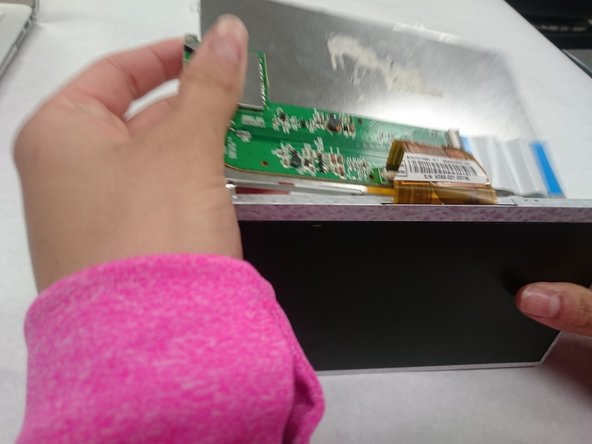
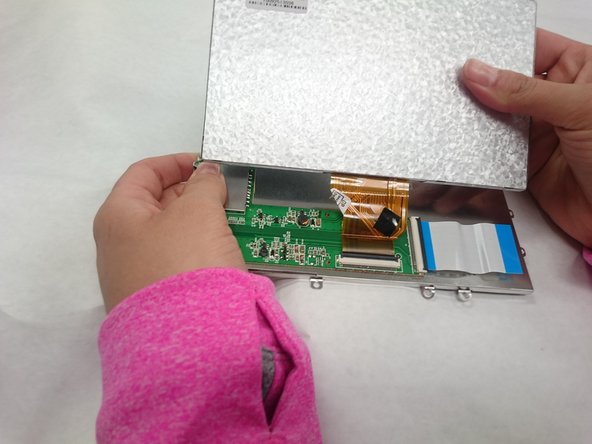
  13. The Sharper Image Literati Tablet Screen Replacement, Screen: step 13, image 1 of 3 The Sharper Image Literati Tablet Screen Replacement, Screen: step 13, image 2 of 3 The Sharper Image Literati Tablet Screen Replacement, Screen: step 13, image 3 of 3
    • Unravel the screen from the silver backing.

    Ask FixBot

    Add Comment

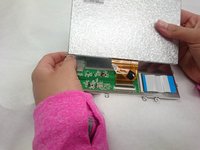
  14. The Sharper Image Literati Tablet Screen Replacement: step 14, image 1 of 1
    • Unclip JIF clip and remove ribbin cable.

    Ask FixBot

    Add Comment

Conclusion

To reassemble your device, follow these instructions in reverse order.

Cancel: I did not complete this guide.

Spencer Dodder

Member since: 03/21/18

560 Reputation

4 Guides authored

Team

IUPUI, Team S5-G4, Baechle Spring 2018 Member of IUPUI, Team S5-G4, Baechle Spring 2018

IUPUI-BAECHLE-S18S5G4

3 Members

8 Guides authored

0 Guide Comments

Add Comment

View Statistics:

Past 24 Hours: 1

Past 7 Days: 6

Past 30 Days: 30

All Time: 557