
The Claw Music Player Cleaning

Alain Pierre and
Last updated on May 7, 2024
Views: 1.4K
View statistics:
- Past 24 Hours:
- 2
- Past 7 Days:
- 15
- Past 30 Days:
- 78
- All Time:
- 1,404
Comments: 0
No one has left comments on this guide. Will you be first?
Go to guide commentsCompleted: 1 2
1 person has marked this guide "completed." Will you be next?
2 people have marked this guide "completed." Including you — great job!
Favorites: 0 1
No one has favorited (and subscribed to) this guide. Will you be the first?
1 person has favorited (and subscribed to) this guide — and that's you!
Scenic Route
This guide's procedure isn't the most efficient way to get the job done, but still may be useful in some circumstances.
Introduction
Go to step 1 ↓In certain cases the device will stop playing music or begin to play distorted music. If this is the case with your claw device, you probably need to open the bottom of the device and clean off the speaker or clean out the sound port on the bottom cover. This guide will assist you in taking the proper measure to do so.
What you need
Tools


-
-
-
-
You will need to cut the two green wires attached to the music player.
-
Then you will need to cut the white wire that leads to the battery compartment.
-
Finally you will need to cut the black wire leading to the battery compartment as well.
-
-
-
-
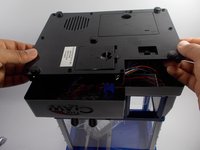
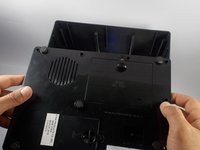
Once you have removed the bottom cover you should have clear access to the music player.
-
Locate the music player and check to see if it is visibly dirty or clogged.
-
Using the straw that comes with your air duster, aim the duster in a way that the air will push the dust away from the music player.
-
-
Tool used on this step:Tweezers$4.99
-
If there are any large pieces of lint or dust in the sound port, those can be removed with your precision tweezers.
-
Once you are certain you have removed all of the dust and dirt from the music player you should reassemble the device and test it.
-
-

 Ask FixBot




To reassemble your device, follow these instructions in reverse order.
Cancel: I did not complete this guide.
One other person completed this guide.

Team

UMass Dartmouth, Team 4-8, Catania Spring 2016 Member of UMass Dartmouth, Team 4-8, Catania Spring 2016
UMASSD-CATANIA-S16S4G8
3 Members
108 Guides authored
