Free Shipping on Domestic Orders $75+

The 2006 Chevy Silverado Key Fob Battery Replacement and Programming Guide

What you need

  1. The 2006 Chevy Silverado Key Fob Battery Replacement and Programming Guide, The 2006 Chevy Silverado Key Fob Battery Replacement and Programming Guide: step 1, image 1 of 1
    • Use the spudger to pry open the key fob shell by sliding it in between the front and back part of the key fob.

    Ask FixBot

    Add Comment

  2. The 2006 Chevy Silverado Key Fob Battery Replacement and Programming Guide: step 2, image 1 of 1
    • To remove the buttons, lift the "rubber button pad'' from the key fob shell.

    Ask FixBot

    Add Comment

  3. The 2006 Chevy Silverado Key Fob Battery Replacement and Programming Guide: step 3, image 1 of 1
    • Remove the old CR2032 battery by simply pulling it out and replace it with a new one.

    Ask FixBot

    Add Comment

  4. The 2006 Chevy Silverado Key Fob Battery Replacement and Programming Guide: step 4, image 1 of 1
    • Insert rubber button pad over the battery. Place the front end of the key fob over the buttons and press down until you hear a "click".

    Ask FixBot

    Add Comment

  5. The 2006 Chevy Silverado Key Fob Battery Replacement and Programming Guide: step 5, image 1 of 1
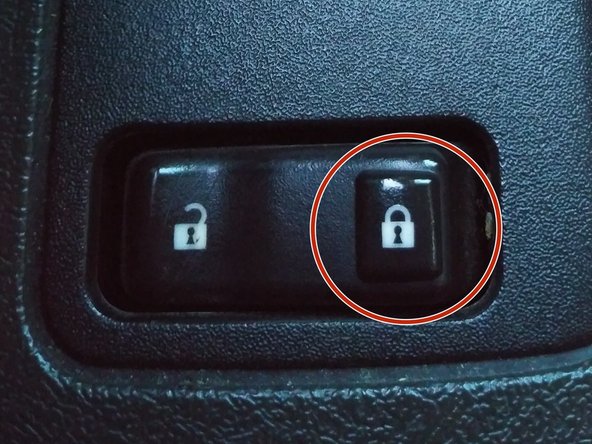
    • Press the vehicle lock button to ensure all doors of the vehicle are locked.

    Ask FixBot

    Add Comment

  6. The 2006 Chevy Silverado Key Fob Battery Replacement and Programming Guide: step 6, image 1 of 1
    • Insert key into the ignition.

    Ask FixBot

    Add Comment

  7. The 2006 Chevy Silverado Key Fob Battery Replacement and Programming Guide: step 7, image 1 of 1
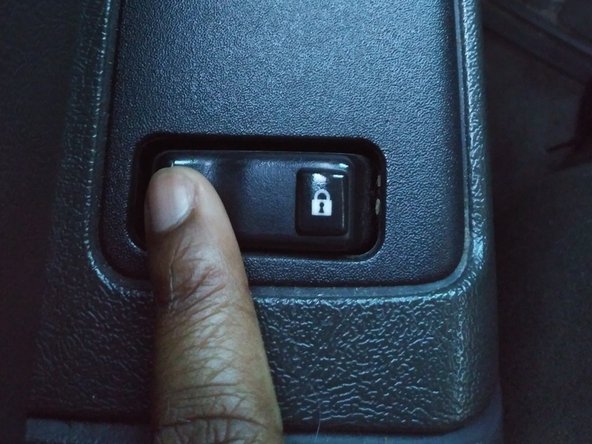
    • Press and hold the unlock button on the driver side door. Do not release until prompted to do so in Step 10.

    Ask FixBot

    Add Comment

    • Swiftly turn the ignition ON and OFF.

    Ask FixBot

    Add Comment

  8. The 2006 Chevy Silverado Key Fob Battery Replacement and Programming Guide: step 9, image 1 of 1
    • Release the unlock button on the driver side door. You should hear the vehicle automatically lock and then unlock.

    Ask FixBot

    Add Comment

  9. The 2006 Chevy Silverado Key Fob Battery Replacement and Programming Guide: step 10, image 1 of 1
    • Press the lock and unlock buttons on the key fob simultaneously until the vehicle automatically locks and unlocks (This can take approx. 30 secs.)

    Ask FixBot

    Add Comment

    • Turn ignition on to exit programming mode.

    Ask FixBot

    Add Comment

    • Turn vehicle off and remove key.

    Ask FixBot

    Add Comment

    • Test key fob by pressing the lock/unlock buttons to ensure functionality.

    Ask FixBot

    Add Comment

Conclusion

To reassemble your device, follow these instructions in reverse order.

Cancel: I did not complete this guide.

One other person completed this guide.

Tiara Bailey

Member since: 02/03/20

244 Reputation

1 Guide authored

0 Guide Comments

Add Comment

View Statistics:

Past 24 Hours: 1

Past 7 Days: 7

Past 30 Days: 36

All Time: 5,117