
Texas Instruments TI-30X IIS Solar Panel Replacement

Kameshwaran Balachandran and one other contributor
Last updated on Jun 14, 2022
Views: 1.6K
View statistics:
- Past 24 Hours:
- 6
- Past 7 Days:
- 17
- Past 30 Days:
- 83
- All Time:
- 1,576
Comments: 0
No one has left comments on this guide. Will you be first?
Go to guide commentsCompleted: 1 2
1 person has marked this guide "completed." Will you be next?
2 people have marked this guide "completed." Including you — great job!
Favorites: 0 1
No one has favorited (and subscribed to) this guide. Will you be the first?
1 person has favorited (and subscribed to) this guide — and that's you!
Introduction
Go to step 1 ↓After many years of use, the solar panels in your Texas Instruments TI-30X IIS will slowly decay, and their capacity to charge will diminish. Thankfully, this can be easily fixed with a bit of time, patience, and some basic tools.
This guide demonstrates how to remove and replace the solar panels.
Caution: Desoldering and soldering presents the potential for device damage and burns. Always solder in well-ventilated environments.
What you need
Tools
-
Spudger4.9
-
-
-


-
-
-
Use a Phillips #000 screwdriver to remove the four 5 mm screws securing the back panel.
 Ask FixBot
-
-
-
Wedge an opening tool in the gap between the front and back panel, then gently pry until the tabs release.
-
-
-
Use a Phillips #000 screwdriver to remove the two 3 mm screws securing the motherboard.
-
-
-
-
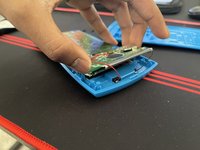
Gently lift up the front of the motherboard, at the top of the calculator.
-
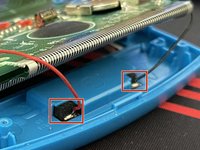
Desolder the positive and negative terminals on the solar panel
-
Use the tip of a spudger to "walk" the solar panel out of its housing, by pushing it down through the two cutouts until it slides out of the bottom.
-
Remove the solar panel.
-
-


To reassemble your device, follow these instructions in reverse order.
Cancel: I did not complete this guide.
One other person completed this guide.

Team

University of Memphis, Team 51-5, Willis Spring 2022 Member of University of Memphis, Team 51-5, Willis Spring 2022
UM-WILLIS-S22S51G5
1 Member
12 Guides authored
