This translation was generated by a machine and has not been reviewed by a person yet. Speak this language? Review it.

Terraillon Bambou Fit Scale Disassembly

Ecuval and one other contributor
Last updated on Sep 2, 2026
Views: 712
View statistics:
- Past 24 Hours:
- 1
- Past 7 Days:
- 22
- Past 30 Days:
- 107
- All Time:
- 712
Comments: 0
No one has left comments on this guide. Will you be first?
Go to guide commentsCompleted: 0 1
No one has marked this guide "completed." Will you be the first?
1 person has marked this guide "completed." It's you — great job!
Favorites: 0 1
No one has favorited (and subscribed to) this guide. Will you be the first?
1 person has favorited (and subscribed to) this guide — and that's you!
Featured Guide
This guide has been found to be exceptionally cool by the iFixit staff.
Community-Contributed Guide
An awesome member of our community made this guide. It was not created by iFixit staff.
Introduction
Go to step 1 ↓Do you want to disassemble your Terraillon Bambou Fit scale to, for example, understand why a touch button is not working?
This guide shows you how to do it without damaging your device.
It also applies to other Terraillon models that have the same underside shell.
What you need
Tools


-
-
-
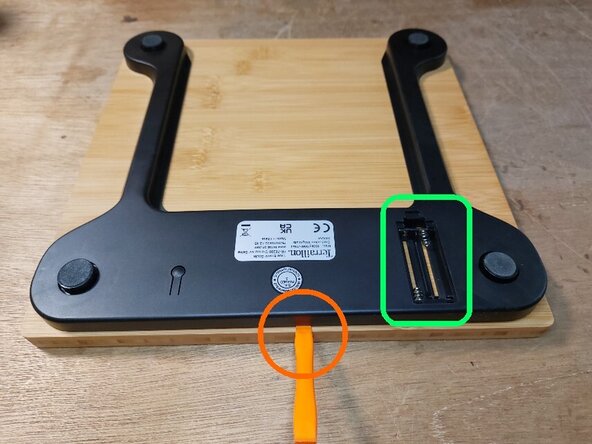
Remove the two AAA batteries.
-
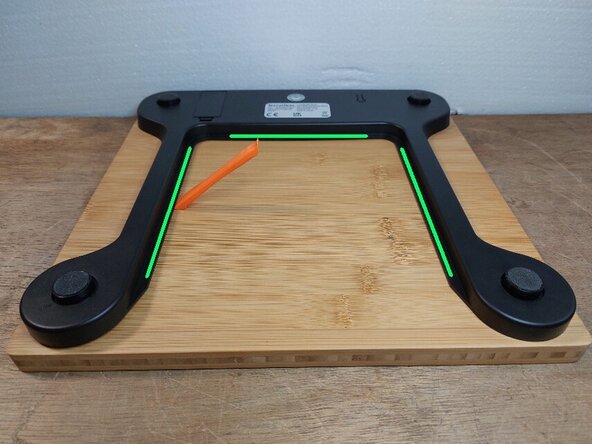
Insert a plastic opening tool a few millimeters into the middle of the top edge of the case. There are no snap fits or adhesive in this area.
-
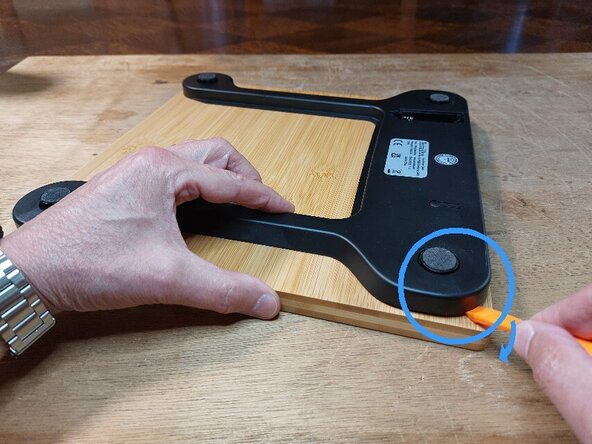
Slide the opening tool, leaving it inserted under the case, toward one of the front feet of the device.
-
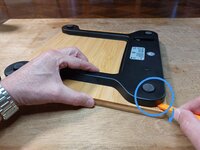
At the corner of the foot, pry with the opening tool. At each of the four feet, two snap fits hold the case in place.
-
Perform the same operation for the other three feet.
 Ask FixBot
-
-
-
Slide the plastic opening tool under the three flat edges and slowly pry along their entire length to peel them off the tray.
-
-
-
Gently lift the bottom case from the side opposite the screen and buttons.
-
The feet are simply resting on the load (weight) sensors.
-
Remove the adhesive tape to release the wires connecting the load sensors and electrodes.
-
The bottom case can now be moved into an upright position. Do not flip it over completely yet, as this would strain the ribbon cable connections between the main circuit board and the button board.
-
-
-
Remove the two Phillips screws securing the main circuit board and display assembly to the bottom case.
-
The bottom case can now be laid flat. It remains connected to the main circuit board and display assembly by the two battery compartment power wires.
-
-
-
Tool used on this step:Spudger$3.99
-
Using a spudger, gently peel the touch button board off the tray.
-
With the batteries back in place, you can check that the touch buttons are working correctly by bringing a finger within about 5 mm of each gold pad.
-
When reinstalling the button board, make sure the pads are properly aligned with the symbols on the top of the tray.
-
The board must be securely attached to the tray, because if it peels off slightly on one side (usually the ribbon cable side), a button may stop working. It is best to replace the old double-sided adhesive tape.
-
-



To reassemble your device, follow the instructions in reverse order.