Free Shipping on Domestic Orders $75+

Teenage Engineering OP-Z Battery Replacement

What you need

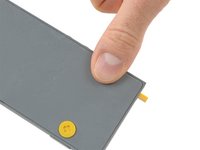
  1. Teenage Engineering OP-Z Battery Replacement, Back Cover: step 1, image 1 of 3 Teenage Engineering OP-Z Battery Replacement, Back Cover: step 1, image 2 of 3 Teenage Engineering OP-Z Battery Replacement, Back Cover: step 1, image 3 of 3
    • Unlock the four rubber feet by turning them 90° counterclockwise using your thumb or finger tip.

    • There is a tiny mark on every foot facing the bottom edge of the OP-Z. After turning them they should face towards the short edge where the on/off switch is.

    Ask FixBot

    Add Comment

  2. Teenage Engineering OP-Z Battery Replacement: step 2, image 1 of 2 Teenage Engineering OP-Z Battery Replacement: step 2, image 2 of 2
    • When turning the OP-Z over again the bottom plate should come off by itself (thanks gravity).

    • If the bottom plate won’t come off you might want to make sure every foot is rotated correctly and gently tug on one of them.

    Ask FixBot

    Add Comment

  3. Teenage Engineering OP-Z Battery Replacement: step 3, image 1 of 1
    • Remove the bottom plate including the rubber feet.

    Ask FixBot

    Add Comment

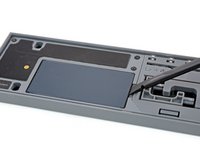
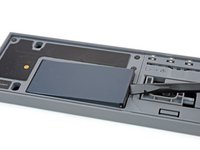
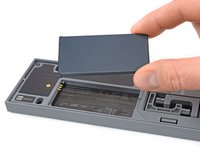
  4. Teenage Engineering OP-Z Battery Replacement, Battery: step 4, image 1 of 2 Teenage Engineering OP-Z Battery Replacement, Battery: step 4, image 2 of 2
    • Use your fingernail or a spudger to lift the battery on the right side where the notch is.

    Ask FixBot

    Add Comment

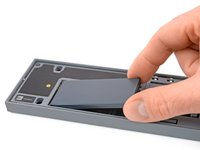
  5. Teenage Engineering OP-Z Battery Replacement: step 5, image 1 of 2 Teenage Engineering OP-Z Battery Replacement: step 5, image 2 of 2
    • Remove the battery.

    • When installing the new battery make sure you put it in contact side first.

    Ask FixBot

    Add Comment

Conclusion

To reassemble your device, follow these instructions in reverse order.

For optimal performance, calibrate your newly installed battery: Charge it to 100% and keep charging it for at least 2 more hours. Then use your device until it shuts off due to low battery. Finally, charge it uninterrupted to 100%.

Take your e-waste to an R2 or e-Stewards certified recycler.

Repair didn’t go as planned? Ask our Answers community for help.

Cancel: I did not complete this guide.

4 other people completed this guide.

Tobias Isakeit

Member since: 03/31/14

134,129 Reputation

189 Guides authored

Team

2 Guide Comments

Does anyone know if there a way to purchase this battery in Australia? the link for the battery above says not available in Australia.. Does anyone know of another source? thanks

richard - Reply Share

This article seems a bit pointless when you have stopped making the replacement batteries... Any chance you might restart?

Adrian Sell - Reply Share

Add Comment

View Statistics:

Past 24 Hours: 5

Past 7 Days: 31

Past 30 Days: 155

All Time: 11,290