
Tatung TAC-6G Light Element Replacement

Erin Charles and 3 other contributors
Last updated on Jun 13, 2016
Views: 1.3K
View statistics:
- Past 24 Hours:
- 3
- Past 7 Days:
- 17
- Past 30 Days:
- 95
- All Time:
- 1,316
Comments: 1
1 guide comment.
Go to guide commentsCompleted: 0 1
No one has marked this guide "completed." Will you be the first?
1 person has marked this guide "completed." It's you — great job!
Favorites: 0 1
No one has favorited (and subscribed to) this guide. Will you be the first?
1 person has favorited (and subscribed to) this guide — and that's you!
Introduction
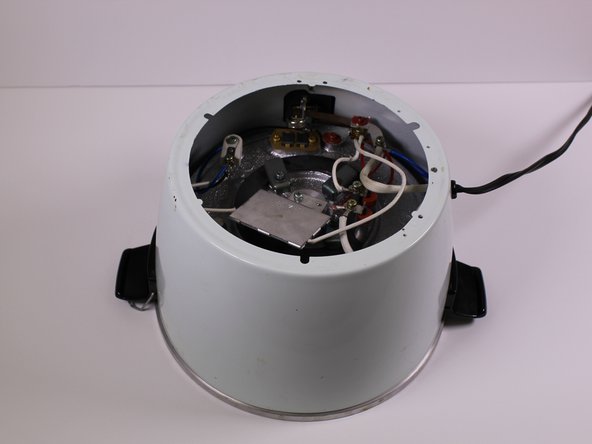
Go to step 1 ↓The device contains small lights that indicate whether the rice is cooking or being kept warm. In this guide we will the expose the light bulb circuitry to check if it is broken and replace the light bulbs if necessary.
What you need
Tools


-
-
-
Pull the panel away from the rice cooker.
-
Remove the 9mm Phillips screw from behind the power component dashboard that is connected to the light plate.
-
-
-
Remove the one 7mm Phillips screw from the side of the brass panel
-
Lift the brass plate off of the device and set it aside.
-
-
-
Remove the 7mm Phillips screw holding the white and maroon colored wires that are connected to the heating element.
-
-
-
Remove the 10mm Phillips screw that connects the white, blue and black wires to the white plastic piece in the corner of the device.
-
-
-
-
Remove the 7mm Phillips screw that connects two white wires and one red wire to the heating "warm" switch.
-
-
-
Using your hand, pull out the light plate with the maroon red and black wires.
-

 Ask FixBot




To reassemble your device, follow these instructions in reverse order.

Team

University of Alabama, Team 1-6, Sydow campbell Spring 2016 Member of University of Alabama, Team 1-6, Sydow campbell Spring 2016
UA-SYDOW CAMPBELL-S16S1G6
4 Members
36 Guides authored
