
TOZO HT2 Battery Replacement

Raven M and 4 other contributors
Last updated on Jan 2, 2025
Views: 1.3K
View statistics:
- Past 24 Hours:
- 3
- Past 7 Days:
- 16
- Past 30 Days:
- 80
- All Time:
- 1,283
Comments: 1
1 comment on steps.
Completed: 0 1
No one has marked this guide "completed." Will you be the first?
1 person has marked this guide "completed." It's you — great job!
Favorites: 0 1
No one has favorited (and subscribed to) this guide. Will you be the first?
1 person has favorited (and subscribed to) this guide — and that's you!
Introduction
Go to step 1 ↓Every electronic device powered by batteries will eventually need a replacement, as batteries degrade over time with use. After a long time of use, the battery can begin to deteriorate losing functionality much like a phone after years of use. Symptoms of a deteriorating battery include shorter charge time, difficulty recharging, or complete failure. These are common signs of declining battery health. In this guide, we’ll walk you through replacing the battery located beneath the left ear pad. Be prepared to carefully navigate around the daughterboard during the replacement. Following these steps will ensure your device regains its optimal performance with a fully functional battery.
Each of the screws for this project are the same 6.3mm Phillips head screws.
What you need
Tools
-
-
Spudger4.9
-


-
-
-
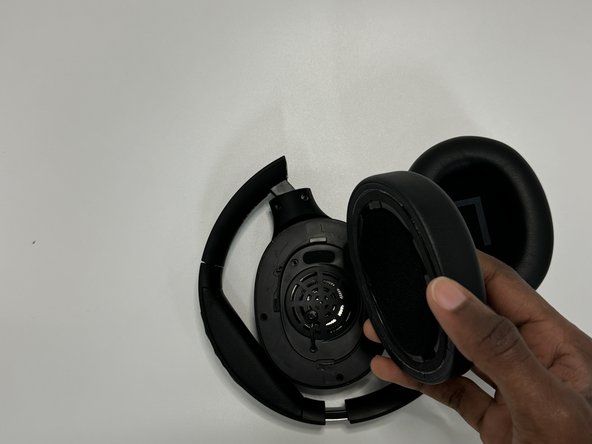
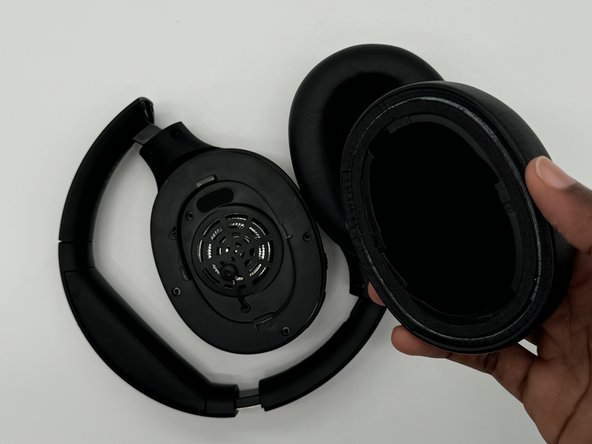
Firmly hold the headphone housing in one hand to hold the device steady and put the other hand on the ear pad you intend to replace.
 Ask FixBot
-
-
-
-
-
-
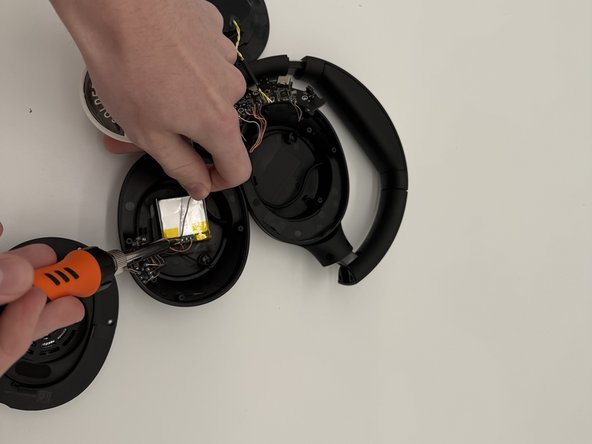
Take wire cutters and carefully snip the battery free, cutting as close to the battery as possible.
-




To reassemble your device, follow the above steps in reverse order.
For optimal performance, after completing this guide, calibrate your newly installed battery.
Take your e-waste to an R2 or e-Stewards certified recycler.
Repair didn’t go as planned? Try some basic troubleshooting or ask our Answers community for help.

Team

University of North Texas, Team 7-2, Kilpatrick Fall 2024 Member of University of North Texas, Team 7-2, Kilpatrick Fall 2024
UNT-KILPATRICK-F24S7G2
4 Members
60 Guides authored
