
Swiffer SweeperVac Filter Replacement

Adeoluwa and 4 other contributors
Last updated on Aug 8, 2019
Views: 1.5K
View statistics:
- Past 24 Hours:
- 3
- Past 7 Days:
- 16
- Past 30 Days:
- 84
- All Time:
- 1,524
Comments: 0
No one has left comments on this guide. Will you be first?
Go to guide commentsCompleted: 1 2
1 person has marked this guide "completed." Will you be next?
2 people have marked this guide "completed." Including you — great job!
Favorites: 1 2
1 person has favorited (and subscribed to) this guide. Will you be next?
2 people have favorited (and subscribed to) this guide — including you!
Introduction
Go to step 1 ↓This guide will show the user of a Swiffer SweeeperVac how to replace a damaged filter. Provided below are step by step instructions on how to replace the filter.
-
-
-
-
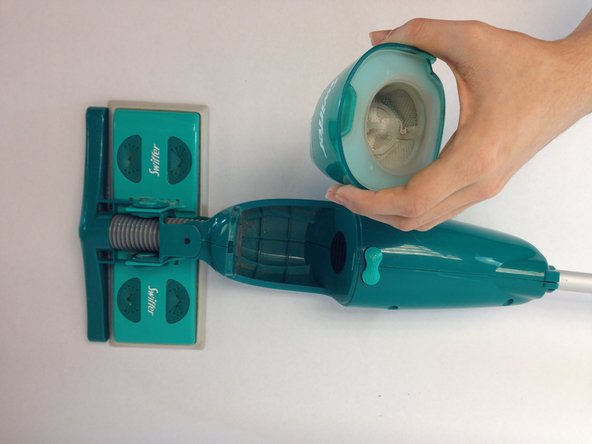
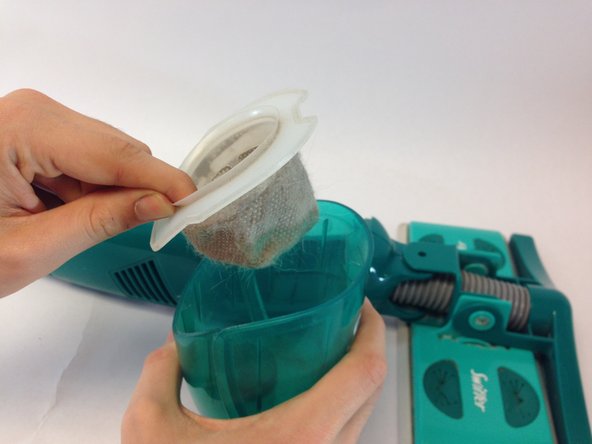
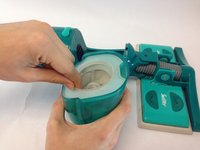
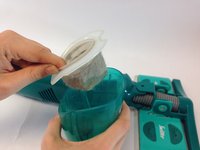
Once the dirt container is removed, hold the dirt container firmly with one hand and use your other hand to gently lift the filter out of the dirt container.
-
-

 Ask FixBot



To reassemble your device, follow these instructions in reverse order.
Cancel: I did not complete this guide.
One other person completed this guide.

Team

USF Tampa, Team 10-3, Brown Fall 2014 Member of USF Tampa, Team 10-3, Brown Fall 2014
USFT-BROWN-F14S10G3
3 Members
60 Guides authored
