
SwagTron T1 Back Panels Replacement

Adrian Abarca and 4 other contributors
Last updated on Jun 7, 2017
Views: 1.2K
View statistics:
- Past 24 Hours:
- 2
- Past 7 Days:
- 17
- Past 30 Days:
- 88
- All Time:
- 1,195
Comments: 7
7 comments on steps.
Completed: 0 1
No one has marked this guide "completed." Will you be the first?
1 person has marked this guide "completed." It's you — great job!
Favorites: 0 1
No one has favorited (and subscribed to) this guide. Will you be the first?
1 person has favorited (and subscribed to) this guide — and that's you!
Introduction
Go to step 1 ↓This explains what will be necessary to not only replace the back panels, but also open the SwagTron T1 to have access to other parts.
What you need
Tools

-
-
-
Unscrew the eighteen 10mm screws that secure the back panels using a Phillips #2 screwdriver.
-
Carefully lift the panels off
-
-
-
-
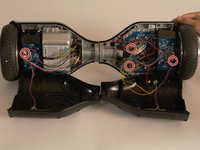
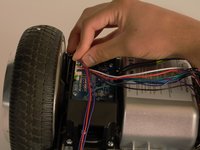
Follow the wires from the panels to the motherboard.
-
You may need to cut any zip ties that are holding the wires together.
-
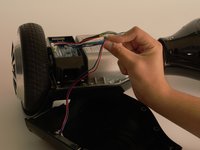
There is one connection on the battery side and three on the other side that must be removed.
-
Your back panels are now completely removed.
-

 Ask FixBot





To reassemble your device, follow these instructions in reverse order.

Team

Cal Poly, Team S17-G5, Banghart Spring 2017 Member of Cal Poly, Team S17-G5, Banghart Spring 2017
CPSU-BANGHART-S17S17G5
4 Members
60 Guides authored
