Introduction
If your touchscreen does not respond to a finger or stylus, you need to replace the touchscreen sensor. As a prerequisite, use the motherboard replacement guide to reveal the touchscreen after opening the back.
What you need
-
-
-
Pull the yellow ribbon cable to dislodge the screen from the plastic screen cover.
 Ask FixBot
-
-
-
-
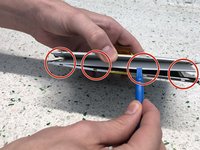
Tear the yellow tape in order to make the front and back covers free to disassemble.
-
-
Tool used on this step:Tweezers$4.99
-
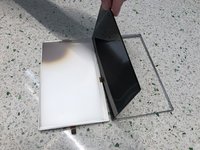
Separate the two covers.
-
Put aside the white sheets.
-
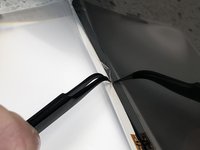
Use the tweezers to remove the sting glue and separate the glue from the sensor.
-
-


To reassemble your device, follow these instructions in reverse order.

Team

University of North Texas, Team S4-G4, Raign Fall 2018 Member of University of North Texas, Team S4-G4, Raign Fall 2018
UNT-RAIGN-F18S4G4
3 Members
48 Guides authored
