Free Shipping on Domestic Orders $75+

Supersonic SC-777BT Camera Replacement

What you need

    1. Supersonic SC-777BT Camera Replacement, Camera: step 1, image 1 of 3 Supersonic SC-777BT Camera Replacement, Camera: step 1, image 2 of 3 Supersonic SC-777BT Camera Replacement, Camera: step 1, image 3 of 3
      • Remove the back cover using the plastic opening tool.

      • Open the cover like a book so you do not disconnect the yellow plastic holding the cover to the motherboard.

      Ask FixBot

      Add Comment

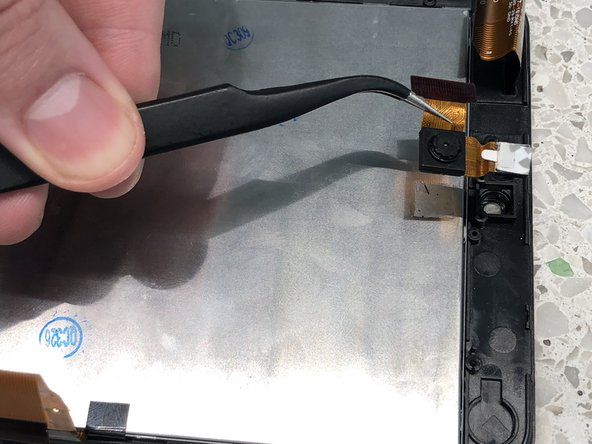
    2. Supersonic SC-777BT Camera Replacement: step 2, image 1 of 3 Supersonic SC-777BT Camera Replacement: step 2, image 2 of 3 Supersonic SC-777BT Camera Replacement: step 2, image 3 of 3
      Tool used on this step:
      Tweezers
      $4.99
      Buy
      • Remove the two screws using the screwdriver.

      • Use the tweezers to pull the camera out of place.

      • Be gentle while pulling it out so you do not pull any extra components out.

      Ask FixBot

      Add Comment

    3. Supersonic SC-777BT Camera Replacement: step 3, image 1 of 1
      • Disconnect the yellow ribbon cable from the connector.

      Ask FixBot

      Add Comment

    4. Supersonic SC-777BT Camera Replacement: step 4, image 1 of 2 Supersonic SC-777BT Camera Replacement: step 4, image 2 of 2
      • Remove camera.

      • It should just peel off like a sticker.

      Ask FixBot

      Add Comment

Conclusion

To reassemble your device, follow these instructions in reverse order.

Cancel: I did not complete this guide.

One other person completed this guide.

0 Guide Comments

Add Comment

View Statistics:

Past 24 Hours: 0

Past 7 Days: 3

Past 30 Days: 25

All Time: 410