Introduction
Many gamers encounter issues with their computer components, in this case the scroll wheel of the Steelseries Rival 3 mouse.
Malfunctions in scroll wheels can happen from the scroll wheel losing its traction and rough play which can cause parts to detach internally or break.
To get started, you can purchase an extra scroll wheel from popular platforms such as;
In the event of mouse damage, understanding how to dissect and fix the mouse yourself can save you from hefty repair fees and unnecessary replacement costs. While gaming mice can range from $40 to $200, a simple scroll wheel repair requires just a small investment.
What you need
-
-
-
Use a Phillips #0 screwdriver to remove the four screws from the base of the mouse and remove the casing.
-
-
-
-
Remove the wire that is connected to the circuit board of the mouse as shown in the image.
-
-
-
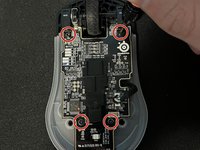
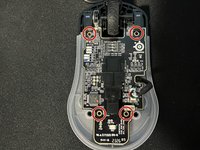
Remove the four black screws along the circuit board using a Phillips #0 screwdriver.
-

 Ask FixBot




To reassemble your device, follow these instructions in reverse order.
Cancel: I did not complete this guide.
3 other people completed this guide.

Team

York University, Team O-20, O'Regan Winter 2024 Member of York University, Team O-20, O'Regan Winter 2024
YORK-O'REGAN-W24SOG20
1 Member
11 Guides authored
3 Guide Comments
in need help there i no place i can find that actually has the right one please help
you can't find the part? because i just found one on aliexpress for 5 dollars..
unless ur in a diff country, in which case tell me where and ill see if i can help you
