Free Shipping on Domestic Orders $75+

SteelSeries Stratus Duo Thumbsticks Replacement

What you need

  1. SteelSeries Stratus Duo Thumbsticks Replacement, Remove the sticker: step 1, image 1 of 2 SteelSeries Stratus Duo Thumbsticks Replacement, Remove the sticker: step 1, image 2 of 2
    • Use your fingers to remove the sticker located on the back cover of the Stratus Duo.

    • If you have trouble removing the sticker, heat an iOpener and apply it to the rear case for two minutes to loosen the adhesive underneath. You can also use a hair dryer to soften the adhesive.

    Ask FixBot

    Add Comment

  2. SteelSeries Stratus Duo Thumbsticks Replacement, Unscrew the back cover: step 2, image 1 of 1
    • Use a Y0 Tri-point screwdriver to remove the five 9.3 mm-long screws securing the back cover.

    Ask FixBot

    Add Comment

  3. SteelSeries Stratus Duo Thumbsticks Replacement, Reposition the back cover assembly: step 3, image 1 of 3 SteelSeries Stratus Duo Thumbsticks Replacement, Reposition the back cover assembly: step 3, image 2 of 3 SteelSeries Stratus Duo Thumbsticks Replacement, Reposition the back cover assembly: step 3, image 3 of 3
    • Don't try to remove the back cover assembly all the way yet, as it's still connected to the mainboard.

    • Carefully lift the back cover assembly away from the frame and move it downward to uncover the battery cable and the interconnect cable at the top of the motherboard.

    Ask FixBot

    Add Comment

  4. SteelSeries Stratus Duo Thumbsticks Replacement, Disconnect the interconnect cable: step 4, image 1 of 3 SteelSeries Stratus Duo Thumbsticks Replacement, Disconnect the interconnect cable: step 4, image 2 of 3 SteelSeries Stratus Duo Thumbsticks Replacement, Disconnect the interconnect cable: step 4, image 3 of 3
    • Using the pointed end of a spudger, push the grey tabs on the interconnect socket away from the socket, parallel to the interconnect cable, to release the cable.

    Ask FixBot

    Add Comment

  5. SteelSeries Stratus Duo Thumbsticks Replacement: step 5, image 1 of 2 SteelSeries Stratus Duo Thumbsticks Replacement: step 5, image 2 of 2
    Tool used on this step:
    Tweezers
    $4.99
    Buy
    • Use a pair of blunt nosed tweezers or your fingers to pull the cable out of the socket.

    Ask FixBot

    Add Comment

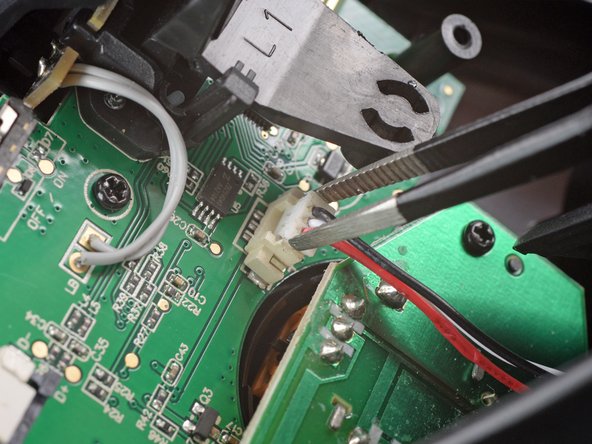
  6. SteelSeries Stratus Duo Thumbsticks Replacement, Disconnect the battery cable: step 6, image 1 of 3 SteelSeries Stratus Duo Thumbsticks Replacement, Disconnect the battery cable: step 6, image 2 of 3 SteelSeries Stratus Duo Thumbsticks Replacement, Disconnect the battery cable: step 6, image 3 of 3
    • Use a pair of blunt nose tweezers to grab and lift the connector away from the motherboard.

    Ask FixBot

    Add Comment

  7. SteelSeries Stratus Duo Thumbsticks Replacement, Remove the back cover assembly: step 7, image 1 of 1
    • Remove the back cover assembly.

    Ask FixBot

    Add Comment

  8. SteelSeries Stratus Duo Thumbsticks Replacement, Unscrew the thumbsticks board: step 8, image 1 of 1
    • Use a Phillips screwdriver to remove the two 6.8 mm-long screws securing the thumbsticks board.

    Ask FixBot

    Add Comment

  9. SteelSeries Stratus Duo Thumbsticks Replacement, Disconnect the thumbsticks board: step 9, image 1 of 3 SteelSeries Stratus Duo Thumbsticks Replacement, Disconnect the thumbsticks board: step 9, image 2 of 3 SteelSeries Stratus Duo Thumbsticks Replacement, Disconnect the thumbsticks board: step 9, image 3 of 3
    • Grab the thumbsticks board with your hand and disconnect it by pulling it straight up and out of its socket on the mainboard.

    • Remove the thumbsticks board.

    • For reassembly make sure to correctly align the ten pins with their socket on the mainboard.

    Ask FixBot

    Add Comment

Conclusion

To reassemble your device, follow these instructions in reverse order.

Take your e-waste to an R2 or e-Stewards certified recycler.

Repair didn’t go as planned? Check our Answers community for help.

Cancel: I did not complete this guide.

One other person completed this guide.

Adriana Zwink

Member since: 12/18/19

67,717 Reputation

167 Guides authored

Team

iFixit Member of iFixit

Staff

123 Members

30,155 Guides authored

4 Guide Comments

where do i buy the thumbsticks board

Juan Ureña - Reply Share

Does anyone know where to source the thumbstick daughter board? I tried talking to steelseries direct and they will not sell it as a replacement. I love this controller, but these failed about 9 months ago and haven't as yet been able to justify replacing the whole controller with this being the only defect. It seems convenient for this part to be a "swappable" type - yet there are NO replacement parts our there in the wild that i've been able to locate. I've been using a xbox core controller ever since. Please advise.

Christopher Claspille - Reply Share

In case it helps anyone, I had an issue when multiple solder joints had broken away from the board, in the y-axis of my left thumbstick was no longer working as expected. Whenever I applied pressure, it would zero out (i.e., go "all the way up").

If you can find the joints that have broken, it's possible to work around with some bypass cables. Some photos here: https://hachyderm.io/@erichdongubler/110...

Erich Gubler - Reply Share

Thanks for the guide. My thumbstick button didn't work. I found bad solder joints/damaged traces at the pushbutton pins. I scraped off some of the solder mask on the trace next to the pins and resoldered them. Success!

Gero - Reply Share

Add Comment

View Statistics:

Past 24 Hours: 1

Past 7 Days: 16

Past 30 Days: 165

All Time: 3,843