Free Shipping on Domestic Orders $75+

SteelSeries Stratus Duo Charging Port Replacement

What you need

  1. SteelSeries Stratus Duo Charging Port Replacement, Remove the sticker: step 1, image 1 of 2 SteelSeries Stratus Duo Charging Port Replacement, Remove the sticker: step 1, image 2 of 2
    • Use your fingers to remove the sticker located on the back cover of the Stratus Duo.

    • If you have trouble removing the sticker, heat an iOpener and apply it to the rear case for two minutes to loosen the adhesive underneath. You can also use a hair dryer to soften the adhesive.

    Ask FixBot

    Add Comment

  2. SteelSeries Stratus Duo Charging Port Replacement, Unscrew the back cover: step 2, image 1 of 1
    • Use a Y0 Tri-point screwdriver to remove the five 9.3 mm-long screws securing the back cover.

    Ask FixBot

    Add Comment

  3. SteelSeries Stratus Duo Charging Port Replacement, Reposition the back cover assembly: step 3, image 1 of 3 SteelSeries Stratus Duo Charging Port Replacement, Reposition the back cover assembly: step 3, image 2 of 3 SteelSeries Stratus Duo Charging Port Replacement, Reposition the back cover assembly: step 3, image 3 of 3
    • Don't try to remove the back cover assembly all the way yet, as it's still connected to the mainboard.

    • Carefully lift the back cover assembly away from the frame and move it downward to uncover the battery cable and the interconnect cable at the top of the motherboard.

    Ask FixBot

    Add Comment

  4. SteelSeries Stratus Duo Charging Port Replacement, Disconnect the interconnect cable: step 4, image 1 of 3 SteelSeries Stratus Duo Charging Port Replacement, Disconnect the interconnect cable: step 4, image 2 of 3 SteelSeries Stratus Duo Charging Port Replacement, Disconnect the interconnect cable: step 4, image 3 of 3
    • Using the pointed end of a spudger, push the grey tabs on the interconnect socket away from the socket, parallel to the interconnect cable, to release the cable.

    Ask FixBot

    Add Comment

  5. SteelSeries Stratus Duo Charging Port Replacement: step 5, image 1 of 2 SteelSeries Stratus Duo Charging Port Replacement: step 5, image 2 of 2
    Tool used on this step:
    Tweezers
    $4.99
    Buy
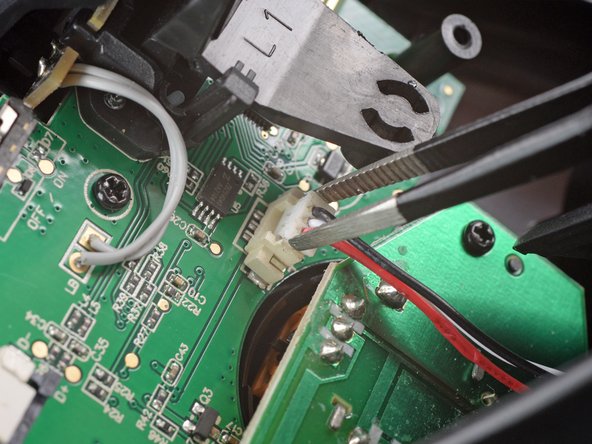
    • Use a pair of blunt nosed tweezers or your fingers to pull the cable out of the socket.

    Ask FixBot

    Add Comment

  6. SteelSeries Stratus Duo Charging Port Replacement, Disconnect the battery cable: step 6, image 1 of 3 SteelSeries Stratus Duo Charging Port Replacement, Disconnect the battery cable: step 6, image 2 of 3 SteelSeries Stratus Duo Charging Port Replacement, Disconnect the battery cable: step 6, image 3 of 3
    • Use a pair of blunt nose tweezers to grab and lift the connector away from the motherboard.

    Ask FixBot

    Add Comment

  7. SteelSeries Stratus Duo Charging Port Replacement, Remove the back cover assembly: step 7, image 1 of 1
    • Remove the back cover assembly.

    Ask FixBot

    Add Comment

  8. SteelSeries Stratus Duo Charging Port Replacement, Pry up the battery: step 8, image 1 of 2 SteelSeries Stratus Duo Charging Port Replacement, Pry up the battery: step 8, image 2 of 2
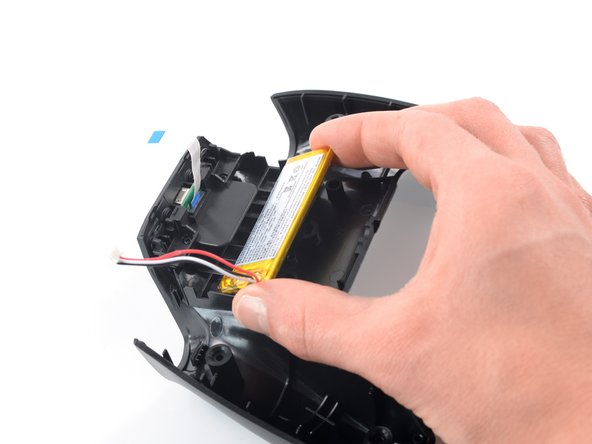
    • The battery is held in place by mild adhesive.

    • Insert the long edge of an opening pick into the gap between the battery and the back cover assembly.

    • Take care not to puncture or bend the battery with your tool—a punctured or bent battery may leak dangerous chemicals or cause a fire.

    • Use the opening pick to carefully pry up the battery and separate the adhesive.

    Ask FixBot

    Add Comment

  9. SteelSeries Stratus Duo Charging Port Replacement, Remove the battery: step 9, image 1 of 3 SteelSeries Stratus Duo Charging Port Replacement, Remove the battery: step 9, image 2 of 3 SteelSeries Stratus Duo Charging Port Replacement, Remove the battery: step 9, image 3 of 3
    • Grab the battery with your fingers and lift it out of its recess to remove it.

    • Do not reinstall a damaged or deformed battery, as doing so is a potential safety hazard.

    • During reassembly make sure to align the battery and the back cover correctly.

    • During reassembly, follow this guide if you are using a pre-cut adhesive card.

    Ask FixBot

    Add Comment

  10. SteelSeries Stratus Duo Charging Port Replacement, Unscrew the plastic bracket: step 10, image 1 of 1
    • Use a Phillips screwdriver to remove the two 7.2 mm-long screws securing the plastic bracket that holds the charging port and the Bluetooth/power buttons in place.

    Ask FixBot

    Add Comment

  11. SteelSeries Stratus Duo Charging Port Replacement, Remove the plastic bracket: step 11, image 1 of 3 SteelSeries Stratus Duo Charging Port Replacement, Remove the plastic bracket: step 11, image 2 of 3 SteelSeries Stratus Duo Charging Port Replacement, Remove the plastic bracket: step 11, image 3 of 3
    • Use your fingers to push the plastic bracket downwards into the recess of the battery to loosen it.

    • Remove the plastic bracket.

    Ask FixBot

    Add Comment

  12. SteelSeries Stratus Duo Charging Port Replacement, Remove the charging port: step 12, image 1 of 1
    • Remove the charging port.

    Ask FixBot

    Add Comment

Conclusion

To reassemble your device, follow these instructions in reverse order.

Take your e-waste to an R2 or e-Stewards certified recycler.

Repair didn’t go as planned? Ask our Answers community for help.

Cancel: I did not complete this guide.

Adriana Zwink

Member since: 12/18/19

67,642 Reputation

167 Guides authored

Team

iFixit Member of iFixit

Staff

123 Members

28,226 Guides authored

1 Guide Comment

Where can i get the replacement board? Stratus is not responding to my messages.

ryan olson - Reply Share

Add Comment

View Statistics:

Past 24 Hours: 1

Past 7 Days: 3

Past 30 Days: 33

All Time: 843