Introduction
If your mouse scrolls erratically, skips inputs, or fails to respond when you rotate the wheel, the issue may be caused by a worn or damaged scroll wheel mechanism. Over time, dust buildup and repeated use can degrade the internal encoder, leading to inconsistent scrolling performance. If the scroll wheel in your SteelSeries Rival 3 Wireless mouse is no longer functioning properly, it may need to be removed and replaced with a new one.
In this guide, we'll show you how to safely replace the scroll wheel in your SteelSeries Rival 3 Wireless gaming mouse.
Check the troubleshooting pages to confirm your mouse needs a new scroll wheel.
Warning: To access the scroll wheel, you’ll need to carefully open the mouse casing to expose the internal components and avoid any possible damage.
Make sure to power off the mouse and remove the batteries before beginning the replacement or working with any internal components.
What you need
-
-
Flip the mouse upside down.
-
Locate the wireless mode switch on the bottom.
-
Slide it to the OFF position.
 Ask FixBot
-
-
-
Place two fingers on the rear top section of the mouse shell.
-
Apply light pressure and slide the battery cover downward (toward you).
-
Slide off the cover and lift away.
-
Remove the two AA batteries.
-
-
-
-
Carefully peel off the mouse feet (skates) from the bottom.
-
Remove the four 5 mm screws with a T6 Torx screwdriver.
-
-
-
Using a prying tool, gently pry the mouse seam open.
-
Gently lift the top shell from the mouse, to locate the scroll wheel.
-
Carefully remove the three 5 mm screws using a Phillips #0 screwdriver.
-
-
-
Unclip any internal wiring that connects the scroll wheel to the circuit board.
-
Remove the 5 mm screw attaching the scroll wheel to the circuit board, using a Phillips #00 screwdriver.
-
Gently remove the faulty scroll wheel by sliding it out of the scroll wheel housing through the side.
-


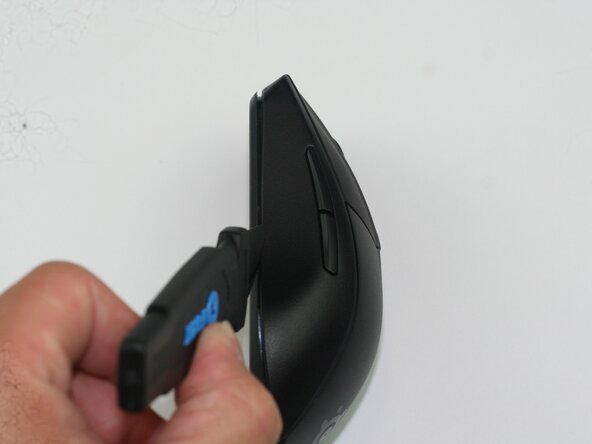


To reassemble your device, follow these instructions in reverse order.

Team

Texas Tech, Team 41-1, Johansen Spring 2026 Member of Texas Tech, Team 41-1, Johansen Spring 2026
TTU-JOHANSEN-S26S41G1
4 Members
5 Guides authored
