Introduction
If Robot’s internal battery does not hold a charge, follow this guide to replace the battery. You will need a Size 00 Philips Screwdriver to complete replacement guide.
What you need
-
-
-
Set Spin Master Boxer on your workspace so that the bottom panel faces upwards.
 Ask FixBot
-
-
-
Using a Phillips #00 screw driver, unscrew the four 4mm screws in each corner of the bottom panel.
-
-
-
Carefully remove the bottom panel of the Spin Master Boxer by lifting up, away from the main body of robot.
-
-
-
-
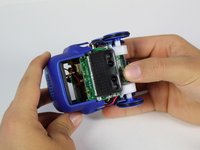
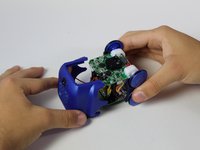
While holding onto the axels of the wheels, gently pull the top panel of the robot away from its body.
-
-
-
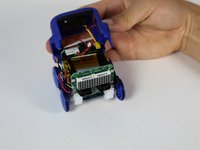
Remove the plastic screen from the body of the robot. It should come off easily as it is not attached by anything.
-
-
-
-
-
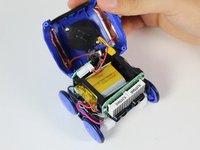
Lift the top panel away from the main body of the robot to expose the yellow battery.
-
-
-
Insert index finger in between battery and plastic shell of robot, and push battery out of the battery holder toward the wire.
-
-
-
Now that the battery is completely removed, additional efforts, like soldering the wires off, must be taken to replace the battery.
-
-






To reassemble your device, follow these instructions in reverse order.
Cancel: I did not complete this guide.
2 other people completed this guide.

Team

Cal Poly, Team S1-G1, Maness Spring 2019 Member of Cal Poly, Team S1-G1, Maness Spring 2019
CPSU-MANESS-S19S1G1
4 Members
60 Guides authored
3 Guide Comments
Any tips on where to buy a replacement battery?
In fact it’s easy, was able to put 1000 mah Lipo 952540 with a little stretching of battery plastic holder
can we replace boxer’s USB slot?
