Introduction
Replacing the grille requires taking off the outside cover and unscrewing 14, 0.6cm screws. You will need a Phillips screwdriver, blue plastic opening tool and a new front metal cover.
What you need
-
-
-
Place the speaker on a flat surface.
-
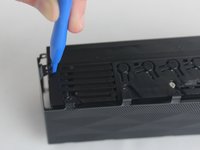
Take your blue plastic opening tool and remove the plastic cover.
 Ask FixBot
-
-
-
-
Orient the speaker so that the top is facing up.
-
Using your Phillips PH0 screwdriver unscrew the 14, 0.6cm screws from the device along the speaker grille.
-
-
-
Reorient the speaker so the grille is facing you.
-
Using the blue plastic opening tool, prop open the metal grille.
-
Now the speaker grille is completely removed from the device and it can be replaced.
-
-


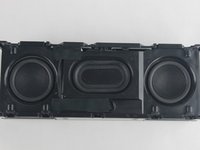
To reassemble your device, follow these instructions in reverse order.
Cancel: I did not complete this guide.
2 other people completed this guide.

Team

USF Tampa, Team 2-50, Cagle Spring 2016 Member of USF Tampa, Team 2-50, Cagle Spring 2016
USFT-CAGLE-S16S2G50
4 Members
24 Guides authored
