Free Shipping on Domestic Orders $75+

Sony Xperia Z5 Compact Screen Replacement

What you need

  1. Sony Xperia Z5 Compact Screen Replacement, Charging port flex: step 1, image 1 of 2 Sony Xperia Z5 Compact Screen Replacement, Charging port flex: step 1, image 2 of 2
    • Power off and remove SIM card tray.

    Ask FixBot

    Add Comment

  2. Sony Xperia Z5 Compact Screen Replacement: step 2, image 1 of 3 Sony Xperia Z5 Compact Screen Replacement: step 2, image 2 of 3 Sony Xperia Z5 Compact Screen Replacement: step 2, image 3 of 3
    • Heat up the back cover to soften the adhesive.

    • Place the suction cup to open a gap from top side, then insert guitar picks and slide it to cut the adhesive underneath.

    • Remove back cover.

    Ask FixBot

    Add Comment

  3. Sony Xperia Z5 Compact Screen Replacement: step 3, image 1 of 2 Sony Xperia Z5 Compact Screen Replacement: step 3, image 2 of 2
    • Remove all 10 Phillips screws.

    • Disconnect NFC clip and flashlight clip.

    Ask FixBot
    Add Comment

  4. Sony Xperia Z5 Compact Screen Replacement: step 4, image 1 of 3 Sony Xperia Z5 Compact Screen Replacement: step 4, image 2 of 3 Sony Xperia Z5 Compact Screen Replacement: step 4, image 3 of 3
    • Remove the plastic bracket.

    • Pry up and remove back frame.

    Ask FixBot

    Add Comment

  5. Sony Xperia Z5 Compact Screen Replacement: step 5, image 1 of 3 Sony Xperia Z5 Compact Screen Replacement: step 5, image 2 of 3 Sony Xperia Z5 Compact Screen Replacement: step 5, image 3 of 3
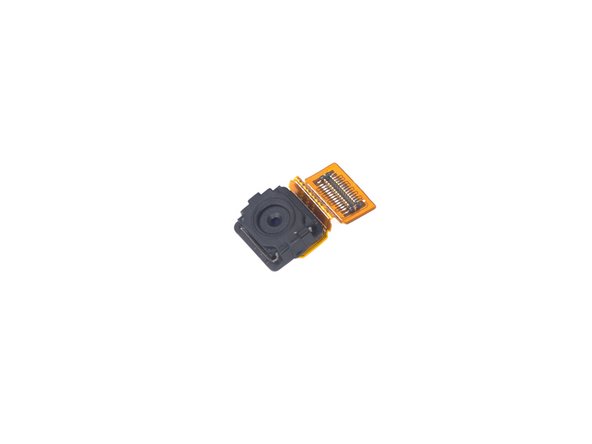
    • Remove front camera.

    Ask FixBot

    Add Comment

  6. Sony Xperia Z5 Compact Screen Replacement: step 6, image 1 of 3 Sony Xperia Z5 Compact Screen Replacement: step 6, image 2 of 3 Sony Xperia Z5 Compact Screen Replacement: step 6, image 3 of 3
    • Remove rear camera.

    Ask FixBot

    Add Comment

  7. Sony Xperia Z5 Compact Screen Replacement: step 7, image 1 of 3 Sony Xperia Z5 Compact Screen Replacement: step 7, image 2 of 3 Sony Xperia Z5 Compact Screen Replacement: step 7, image 3 of 3
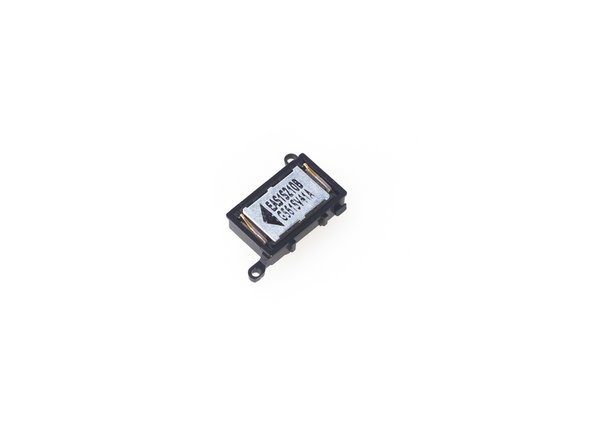
    • Remove loudspeaker.

    Ask FixBot

    Add Comment

  8. Sony Xperia Z5 Compact Screen Replacement: step 8, image 1 of 3 Sony Xperia Z5 Compact Screen Replacement: step 8, image 2 of 3 Sony Xperia Z5 Compact Screen Replacement: step 8, image 3 of 3
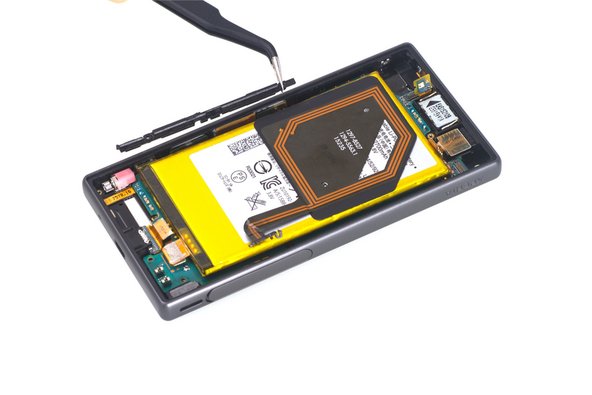
    • Release charging port connector.

    • Remove plastic protective bar.

    • Pry up motherboard assembly from this side. There are three flex connectors connecting the motherboard underneath. So pry up the motherboard assembly gently.

    Ask FixBot
    Add Comment

  9. Sony Xperia Z5 Compact Screen Replacement: step 9, image 1 of 1
    • Remove charging port flex.

    Ask FixBot

    Add Comment

  10. Sony Xperia Z5 Compact Screen Replacement, Screen: step 10, image 1 of 2 Sony Xperia Z5 Compact Screen Replacement, Screen: step 10, image 2 of 2
    • Remove the motherboard/battery assembly.

    • Using a spudger, release the battery connector from the motherboard.

    Ask FixBot

    Add Comment

  11. Sony Xperia Z5 Compact Screen Replacement: step 11, image 1 of 2 Sony Xperia Z5 Compact Screen Replacement: step 11, image 2 of 2
    • Using a suction cup, create a space between the screen and the phone.

    • Using an opening tool, pry the LCD screen up.

    Ask FixBot

    Add Comment

Conclusion

To reassemble your device, follow these instructions in reverse order.

Cancel: I did not complete this guide.

One other person completed this guide.

0 Guide Comments

Add Comment

View Statistics:

Past 24 Hours: 2

Past 7 Days: 8

Past 30 Days: 28

All Time: 1,202