Free Shipping on Domestic Orders $75+

Sony Xperia Z Ultra Front Camera Replacement

What you need

  1. Sony Xperia Z Ultra Front Camera Replacement, Battery: step 1, image 1 of 1
    • Use the small suction cup to lift the back panel:

    • Press the small suction cup on to the middle of the back panel.

    Ask FixBot

    Add Comment

  2. Sony Xperia Z Ultra Front Camera Replacement: step 2, image 1 of 1
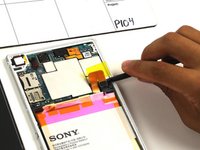
    • While holding the Sony Xperia Z ultra down with your left hand, slightly pull the small suction cup upwards to create a small opening between the back panel and the front panel.

    • While continuing to pull the small suction cup upwards, insert the spudger in the small opening.

    • Pry the front panel downwards with the spudger while continuing to pull the small suction cup upwards.

    Ask FixBot

    Add Comment

  3. Sony Xperia Z Ultra Front Camera Replacement: step 3, image 1 of 1
    • Remove the back panel by pulling the small suction cup upwards.

    Ask FixBot

    Add Comment

  4. Sony Xperia Z Ultra Front Camera Replacement: step 4, image 1 of 1
    • Remove the following six screws with a Phillips #000 screwdriver:

    • five silver 2.1 mm screws

    • one gold 3.1 mm screw

    Ask FixBot

    Add Comment

  5. Sony Xperia Z Ultra Front Camera Replacement: step 5, image 1 of 1
    • Pry the plastic motherboard shield open by placing the spudger under the shield and running it along the edges.

    Ask FixBot

    Add Comment

  6. Sony Xperia Z Ultra Front Camera Replacement: step 6, image 1 of 1
    • Use care to remove the motherboard shield, as it may break. The motherboard shield is made of a very thin plastic.

    • Remove the motherboard shield by lifting the lower end upwards first.

    Ask FixBot

    Add Comment

  7. Sony Xperia Z Ultra Front Camera Replacement: step 7, image 1 of 2 Sony Xperia Z Ultra Front Camera Replacement: step 7, image 2 of 2
    • Detach the battery connection cable by prying it upward with the spudger.

    Ask FixBot

    Add Comment

  8. Sony Xperia Z Ultra Front Camera Replacement: step 8, image 1 of 1
    • Pry the upper end of the antenna upwards with the spudger.

    Ask FixBot

    Add Comment

  9. Sony Xperia Z Ultra Front Camera Replacement: step 9, image 1 of 1
    • Detach the antenna by pulling the upper end upwards and outwards.

    Ask FixBot

    Add Comment

  10. Sony Xperia Z Ultra Front Camera Replacement: step 10, image 1 of 1
    • Insert the spudger underneath the battery and run it back and forth to remove any adhesive.

    Ask FixBot

    Add Comment

  11. Sony Xperia Z Ultra Front Camera Replacement: step 11, image 1 of 1
    • Remove the battery from the phone.

    Ask FixBot

    Add Comment

  12. Sony Xperia Z Ultra Front Camera Replacement, Front Camera: step 12, image 1 of 1
    • Use care to pry the front camera off, as it can easily be damaged if too much force is used. The connection from the front facing camera to the motherboard is delicate.

    • Pry the connection upwards from the motherboard with the spudger to reveal the front facing camera.

    Ask FixBot

    Add Comment

  13. Sony Xperia Z Ultra Front Camera Replacement: step 13, image 1 of 1
    • Remove the front facing camera by pulling upward on the flap to its right .

    Ask FixBot

    Add Comment

Conclusion

To reassemble your device, follow these instructions in reverse order.

Cancel: I did not complete this guide.

4 other people completed this guide.

Aaron Quinn

Member since: 10/01/15

930 Reputation

3 Guides authored

Team

Cal Poly, Team 4-6, Maness Fall 2015 Member of Cal Poly, Team 4-6, Maness Fall 2015

CPSU-MANESS-F15S4G6

4 Members

10 Guides authored

0 Guide Comments

Add Comment

View Statistics:

Past 24 Hours: 0

Past 7 Days: 18

Past 30 Days: 45

All Time: 2,466