Introduction
In order to remove other parts of your device, you will need to remove the back assembly. You may also need to replace the back panel if it damaged. This guide will show you how to remove the back assembly of your Sony Xperia XA1 Ultra. A heat gun or hairdryer is needed to loosen the adhesive to open the back panel, which can become hot and potentially damage the phone. A suction cup and opening tools will be needed to pry off the cover.
What you need
-
-
-
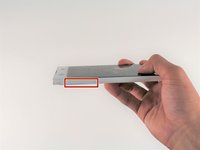
Wedge your finger under the bottom ridge of the SD card insert.
-
Pull outwards with your fingers to remove the SD card from the left side of device.
 Ask FixBot
-
-
-
Use a hair dryer to heat each corner of the phone.
-
Alternate heating each corner for a minute to loosen the adhesive binding the back cover to the phone.
-
-
-
-
Press a suction cup on a heated corner of the device.
-
Hold the phone down and gently lift the suction cup to create a small gap.
-
-
Tool used on this step:Plastic Cards$2.99
-
Insert your iFixit Opening Tool in the small gap between your phone and the back cover.
-
Lift up on the iFixit Opening Tool and insert your plastic card in the small gap between your phone and the back cover.
-
-
-
Slide your plastic card along the side of your phone to loosen the adhesive.
-
Move the card along the sides of the phone to lift all of the corners.
-
-




To reassemble your device, follow these instructions in reverse order.
Cancel: I did not complete this guide.
2 other people completed this guide.

Team

Cal Poly, Team S16-G3, Livingston Spring 2018 Member of Cal Poly, Team S16-G3, Livingston Spring 2018
CPSU-LIVINGSTON-S18S16G3
4 Members
108 Guides authored
1 Guide Comment
What kind of adhesive should be used when reassembling the phone?
