
Sony Xperia T2 Ultra Dual Front Facing Camera Replacement

Christina Wojaczyk and 3 other contributors
Last updated on Jan 10, 2015
Views: 4.4K
View statistics:
- Past 24 Hours:
- 1
- Past 7 Days:
- 21
- Past 30 Days:
- 82
- All Time:
- 4,363
Comments: 2
2 guide comments.
Go to guide commentsCompleted: 8 9
8 people have marked this guide "completed." Will you be next?
9 people have marked this guide "completed." Including you — great job!
Favorites: 1 2
1 person has favorited (and subscribed to) this guide. Will you be next?
2 people have favorited (and subscribed to) this guide — including you!
Introduction
Go to step 1 ↓This guide can help you remove the front facing camera.
What you need
Tools


-
-
-
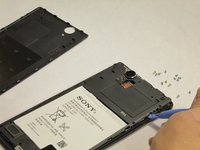
Using the spudger, pry open the back cover by starting alongside the edge of the back cover.
 Ask FixBot
-
-
-
Once the part of the back cover has been opened up. Slide the spudger to pry completely detach the cover from the phone.
-
-
-
-
-
Using the Phillips #00 Precision screwdriver, take out 8 silver screws (3.15mm) and 5 gold screws (3.9mm) for a total of all the screws attached to the flat plate. 3 of the gold screws are located at the top of the phone and the other 2 screws are located at the bottom of the phone.
-
-
-
To remove the internal cover, use the plastic spudger tool and pry the cover from the phone as shown in the picture.
-
-
-
-
-
-
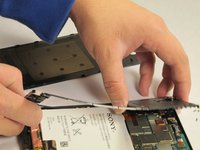
Using the tweezer, carefully pry open the chip for the front facing camera as shown. Then using the tweezer, carefully remove the front facing camera component.
-
-



To reassemble your device, follow these instructions in reverse order.
Cancel: I did not complete this guide.
8 other people completed this guide.

Team

USF Tampa, Team 13-3, Staggers Fall 2014 Member of USF Tampa, Team 13-3, Staggers Fall 2014
USFT-STAGGERS-F14S13G3
3 Members
84 Guides authored
