Free Shipping on Domestic Orders $75+

Sony Vaio VPCW211AX Keyboard Replacement

What you need

    1. Sony Vaio VPCW211AX Keyboard Replacement, Keyboard: step 1, image 1 of 1
      • Start with the laptop face up on a flat surface.

      Ask FixBot

      Add Comment

    2. Sony Vaio VPCW211AX Keyboard Replacement: step 2, image 1 of 1
      • Open the laptop with the keyboard facing you.

      Ask FixBot

      Add Comment

    3. Sony Vaio VPCW211AX Keyboard Replacement: step 3, image 1 of 2 Sony Vaio VPCW211AX Keyboard Replacement: step 3, image 2 of 2
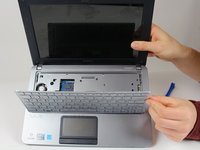
      • Use a plastic opening tool to pry up the keyboard. Start at the end closest to the screen.

      • Be careful around the edges; work your way around the keyboard until all of it is detached.

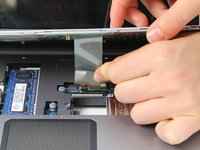
      • There will be a ribbon cable attached to the bottom of the keyboard. Be sure not to rip the cable when lifting the keyboard from the laptop frame.

      Ask FixBot

      Add Comment

    4. Sony Vaio VPCW211AX Keyboard Replacement: step 4, image 1 of 2 Sony Vaio VPCW211AX Keyboard Replacement: step 4, image 2 of 2
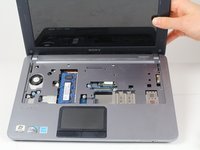
      • Carefully detach the ribbon from the base of the computer with your hands.

      • Remove the keyboard.

      Ask FixBot

      Add Comment

Conclusion

To reassemble your device, follow these instructions in reverse order.

Cancel: I did not complete this guide.

One other person completed this guide.

Giselle Dougan

Member since: 01/31/18

760 Reputation

5 Guides authored

0 Guide Comments

Add Comment

View Statistics:

Past 24 Hours: 1

Past 7 Days: 6

Past 30 Days: 37

All Time: 866