Free Shipping on Domestic Orders $75+

Sony Vaio VGN-S260 Keyboard Replacement

What you need

  1. Sony Vaio VGN-S260 Keyboard Replacement, Battery: step 1, image 1 of 3 Sony Vaio VGN-S260 Keyboard Replacement, Battery: step 1, image 2 of 3 Sony Vaio VGN-S260 Keyboard Replacement, Battery: step 1, image 3 of 3
    • Flip the laptop over so the Vaio logo is facing down.

    • Locate the battery at the top and Find the release and unlock slides on the battery.

    • Slide the unlock tab to the unlock position.

    • Slide the release tab in the direction of the arrow, i.e. towards the unlock tab.

    Ask FixBot

    Add Comment

  2. Sony Vaio VGN-S260 Keyboard Replacement: step 2, image 1 of 2 Sony Vaio VGN-S260 Keyboard Replacement: step 2, image 2 of 2
    • With the tabs still in the unlock position, slide the battery away from the main case.

    Ask FixBot

    Add Comment

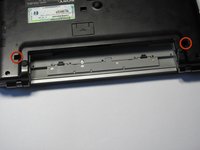
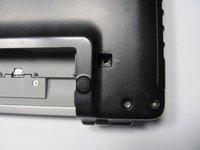
  3. Sony Vaio VGN-S260 Keyboard Replacement, Keyboard: step 3, image 1 of 2 Sony Vaio VGN-S260 Keyboard Replacement, Keyboard: step 3, image 2 of 2
    • Flip the computer over so the Vaio logo is facedown.

    • Unscrew the 2 screws next to the battery.

    Ask FixBot

    Add Comment

  4. Sony Vaio VGN-S260 Keyboard Replacement: step 4, image 1 of 1
    • Flip the computer over again so the Vaio logo is face up.

    • Open the lid.

    Ask FixBot

    Add Comment

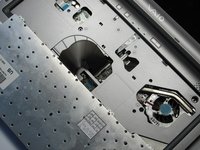
  5. Sony Vaio VGN-S260 Keyboard Replacement: step 5, image 1 of 2 Sony Vaio VGN-S260 Keyboard Replacement: step 5, image 2 of 2
    • Press down on the outer gray shell around the keyboard.

    • Use the spudger to gently lift keyboard.

    • Do not pull up the keyboard too far as it is attached to a ribbon underneath.

    Ask FixBot

    Add Comment

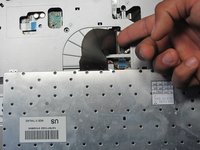
  6. Sony Vaio VGN-S260 Keyboard Replacement: step 6, image 1 of 2 Sony Vaio VGN-S260 Keyboard Replacement: step 6, image 2 of 2
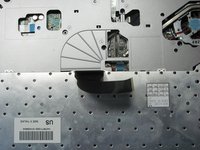
    • Lift up lever underneath the ribbon to detach the keyboard.

    Ask FixBot

    Add Comment

Conclusion

To reassemble your device, follow these instructions in reverse order.

Cancel: I did not complete this guide.

One other person completed this guide.

Jeffrey Bryan

Member since: 04/20/10

570 Reputation

11 Guides authored

Team

Cal Poly, Team 16-4, Maness Spring 2010 Member of Cal Poly, Team 16-4, Maness Spring 2010

CPSU-MANESS-S10S16G4

4 Members

30 Guides authored

0 Guide Comments

Add Comment

View Statistics:

Past 24 Hours: 4

Past 7 Days: 16

Past 30 Days: 44

All Time: 5,971