Introduction
This guide will illustrate on how to remove and replace the motherboard cover.
What you need
-
-
-
Push down the smart watch housing with both thumbs while holding the outer frame.
 Ask FixBot
-
-
-
-
Detach the screen using the plastic prying tool.
-
Detach the LCD screen from the motherboard by pulling the ribbon cable very carefully and slowly.
-
-
-
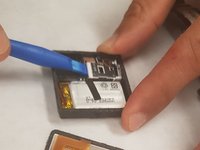
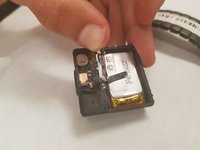
Using a the Spudger, remove the cover. Work your way around to find the most convenient place to open it.
-
-


To reassemble your device, follow these instructions in reverse order.
Cancel: I did not complete this guide.
2 other people completed this guide.

Team

IUPUI, Team S2-G2, Freund Spring 2018 Member of IUPUI, Team S2-G2, Freund Spring 2018
IUPUI-FREUND-S18S2G2
3 Members
24 Guides authored
