Introduction
This repair guide will show how to replace the motherboard of the Sony SRS-XB23. The motherboard is what controls everything on the device, from the button controls to the Bluetooth connectivity.
This replacement may be necessary if the device stops working completely, or if the waterproofing fails and the motherboard has water damage.
Before you begin this repair, ensure the device is powered off and disconnected from the charger.
What you need
-
-
Hold the speaker and insert the flat end of a spudger into the seam next to the end of the rubber button strip.
-
Use a spudger to release each clip along the seams of the device.
 Ask FixBot
-
-
-
Remove mesh cover fully.
-
Note the small nub on the inside of the mesh cover. This will need to be aligned to the hole on the speaker body when reattaching the mesh.
-
-
-
Use a Phillips #1 screwdriver to remove the two 5.0 mm screws holding each end cap in place.
-
-
-
-
Use a Phillips #1 screwdriver to remove the two 10.0 mm screws holding the end cap in place.
-
-
-
Use the heavy-duty spudger to pry one of the tabs holding the end cap to the speaker body.
-
Hold the tab up and insert a blue opening pick into the space to keep the retaining clips from reengaging.
-
Repeat this for each retaining clip, and pull the end caps off the speaker body.
-
Repeat to remove the other end cap.
-
-
-
Remove the eight 8.0 mm PH1 screws holding the front plate of the speakers in place.
-
Gently remove the face plate.
-
Set the face plate close to the side of the speaker.
-
-
-
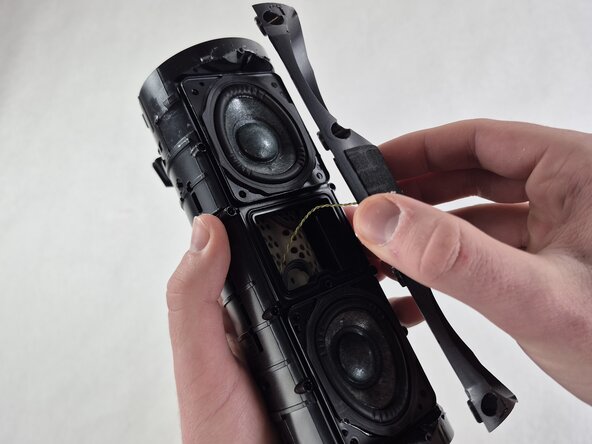
Lift the top speaker driver from the device.
-
Use tweezers to firmly grasp the connector on the end of the speaker cable.
-
Pull outward while wiggling the tweezers slightly to disconnect the speaker cable from the socket.
-
-
-
Use tweezers to grip the white cable connector and gently wiggle it while pulling it out of the socket to disconnect the yellow and gray faceplate cable.
-
-
-
Remove the lower speaker driver from the frame.
-
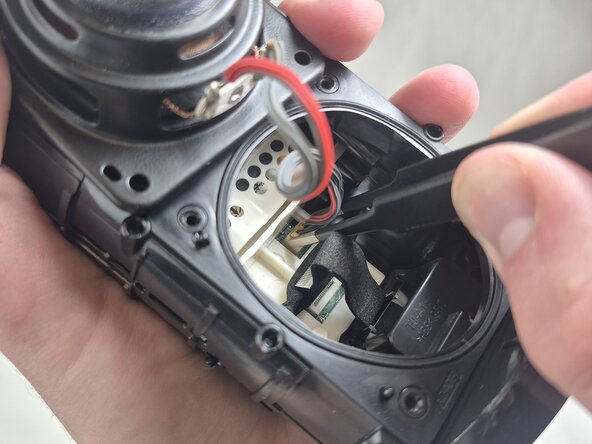
Grip the orange connector on the lower speaker cable with tweezers and gently wiggle it while pulling outward to disconnect it.
-
-
-
Use tweezers to firmly grip the ribbon cable at the bottom of the speaker opening and gently pull it straight out of the socket.
-
-
-
Rotate the speaker so that the top end side is facing you.
-
Use a Phillips #1 screwdriver to remove the four 5.0 mm silver screws holding the motherboard housing in place.
-
-
-
Use your fingers to grip the end of the white motherboard housing and pull it straight out.
-
-
-
Use a Phillips #0 screwdriver to remove the three 3.0 mm black screws on the back of the motherboard.
-
Carefully separate the motherboard from the white plastic housing.
-
Use the point of a spudger to push on alternating sides of the battery connector to "walk" it out of its socket.
-






To reassemble your device, follow these instructions in reverse order. Take your e-waste to an R2 or e-Stewards certified recycler.
Cancel: I did not complete this guide.
One other person completed this guide.

Team

UMass Dartmouth, Team 5-4, Rioux Spring 2026 Member of UMass Dartmouth, Team 5-4, Rioux Spring 2026
UMASSD-RIOUX-S26S5G4
4 Members
5 Guides authored
