Introduction
Looking to replace the battery in your SRS-XB23. This is the guide for you. Whether your battery won't hold a charge or isn't taking a charge anymore, this guide will show you how to replace it.
Caution: Avoid bending or puncturing the battery. If the battery appears swollen or emits a strange odor, handle it with extreme care during removal. Review the What to do with a swollen battery wiki for guidance before attempting to work with a swollen battery.
Before you begin this repair, ensure your Bluetooth speaker is powered off and disconnected from the charger.
What you need
-
-
-
Hold the speaker and insert the flat end of a spudger into the seam next to the end of the rubber button strip.
-
Use a spudger to release each clip along the seams of the device.
 Ask FixBot
-
-
-
Remove mesh cover fully.
-
Note the small nub on the inside of the mesh cover. This will need to be aligned to the hole on the speaker body when reattaching the mesh.
-
-
-
-
-
Use a Phillips #1 screwdriver to remove the two 5.0 mm screws holding each end cap in place.
-
-
-
Use a Phillips #1 screwdriver to remove the two 10.0 mm screws holding the end cap in place.
-
-
-
-
Use the heavy-duty spudger to pry one of the tabs holding the end cap to the speaker body.
-
Hold the tab up and insert a blue opening pick into the space to keep the retaining clips from reengaging.
-
Repeat this for each retaining clip, and pull the end caps off the speaker body.
-
Repeat to remove the other end cap.
-
-
-
Remove the eight 8.0 mm PH1 screws holding the front plate of the speakers in place.
-
Gently remove the face plate.
-
Set the face plate close to the side of the speaker.
-
-
-
Lift the top speaker driver from the device.
-
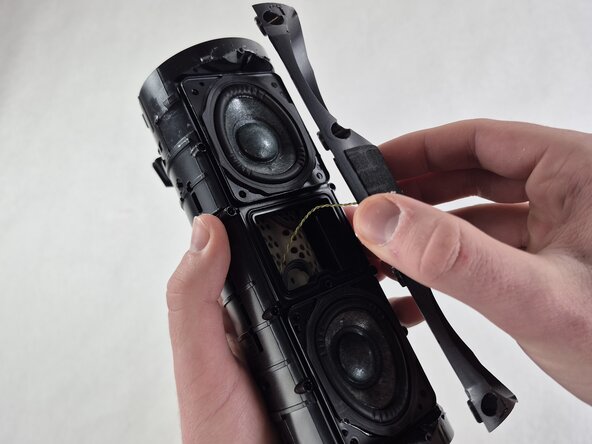
Use tweezers to firmly grasp the connector on the end of the speaker cable.
-
Pull outward while wiggling the tweezers slightly to disconnect the speaker cable from the socket.
-
-
-
Use tweezers to grip the white cable connector and gently wiggle it while pulling it out of the socket to disconnect the yellow and gray faceplate cable.
-
-
-
Remove the lower speaker driver from the frame.
-
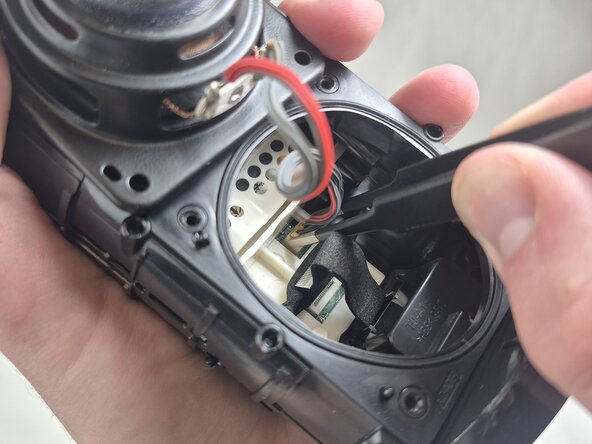
Grip the orange connector on the lower speaker cable with tweezers and gently wiggle it while pulling outward to disconnect it.
-
-
-
-
-
Use tweezers to firmly grip the ribbon cable at the bottom of the speaker opening and gently pull it straight out of the socket.
-
-
-
Rotate the speaker so that the top end side is facing you.
-
Use a Phillips #1 screwdriver to remove the four 5.0 mm silver screws holding the motherboard housing in place.
-
-
-
Use your fingers to grip the end of the white motherboard housing and pull it straight out.
-
-
-
Use a Phillips #0 screwdriver to remove the three 3.0 mm black screws on the back of the motherboard.
-
Carefully separate the motherboard from the white plastic housing.
-
Use the point of a spudger to push on alternating sides of the battery connector to "walk" it out of its socket.
-
-
-






To reassemble your device, follow these instructions in reverse order. Take your e-waste to an R2 or e-Stewards certified recycler.

Team

UMass Dartmouth, Team 5-4, Rioux Spring 2026 Member of UMass Dartmouth, Team 5-4, Rioux Spring 2026
UMASSD-RIOUX-S26S5G4
4 Members
60 Guides authored
