Free Shipping on Domestic Orders $75+

Sony SRS-X5 Bluetooth Replacement

What you need

    1. Sony SRS-X5 Bluetooth Replacement, Battery: step 1, image 1 of 1
      • To gain access to the 6 bottom screws remove the following. Remove the adhered 4 corner foam pads on the bottom of the speaker using the blue plastic opening tool to reveal the screws underneath. Remove the adhered 2 center plastic squares.

      • Make sure the speaker is unplugged and powered down before doing any work on the device.

      Ask FixBot

      Add Comment

    2. Sony SRS-X5 Bluetooth Replacement: step 2, image 1 of 2 Sony SRS-X5 Bluetooth Replacement: step 2, image 2 of 2
      • Unscrew the six 6mm screws with a Phillips head #1 screwdriver.

      • Remove the bottom panel of the speaker.

      Ask FixBot

      Add Comment

    3. Sony SRS-X5 Bluetooth Replacement: step 3, image 1 of 1
      • Unplug the battery by gently pinching the plastic end connected to the smaller board and pull away.

      • Remove the battery.

      Ask FixBot

      Add Comment

    1. Sony SRS-X5 Bluetooth Replacement, Speaker: step 4, image 1 of 1
      • To remove the speaker grill, first push down slightly on the 2 plastic hook tabs to release them, then push the middle plastic screw tab out.

      Ask FixBot

      Add Comment

    2. Sony SRS-X5 Bluetooth Replacement: step 5, image 1 of 1
      • Remove the eight 0.5mm Phillips #1 screws from the speaker panel.

      Ask FixBot

      Add Comment

    3. Sony SRS-X5 Bluetooth Replacement: step 6, image 1 of 2 Sony SRS-X5 Bluetooth Replacement: step 6, image 2 of 2
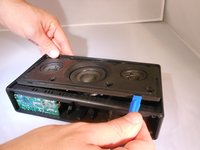
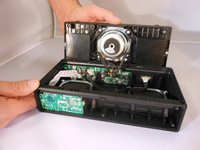
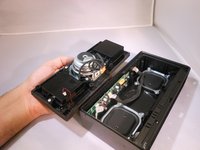
      • Using the plastic opening tool, flip open the speaker panel.

      Ask FixBot

      Add Comment

    4. Sony SRS-X5 Bluetooth Replacement: step 7, image 1 of 3 Sony SRS-X5 Bluetooth Replacement: step 7, image 2 of 3 Sony SRS-X5 Bluetooth Replacement: step 7, image 3 of 3
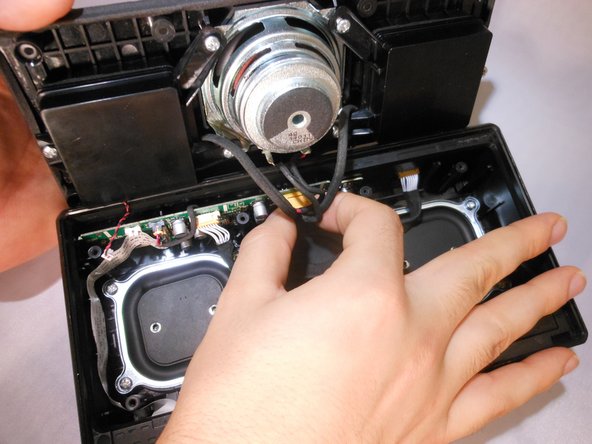
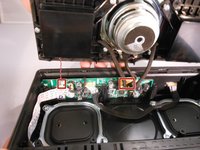
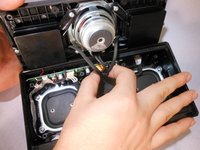
      • Unplug the 6-pin speaker connector and 2-pin microphone connector from the motherboard by squeezing the sides of the plastic ends.

      Ask FixBot

      Add Comment

    1. Sony SRS-X5 Bluetooth Replacement, Bluetooth: step 8, image 1 of 2 Sony SRS-X5 Bluetooth Replacement, Bluetooth: step 8, image 2 of 2
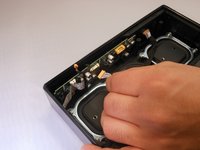
      • Unplug the cord connected to the motherboard by squeezing the plastic sides.

      Ask FixBot

      Add Comment

    2. Sony SRS-X5 Bluetooth Replacement: step 9, image 1 of 1
      • Gently tug on the plastic ribbon connected to the bottom side of the speaker to unplug it.

      Ask FixBot

      Add Comment

    3. Sony SRS-X5 Bluetooth Replacement: step 10, image 1 of 1
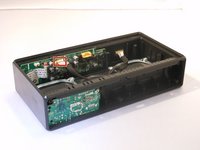
      • Remove the motherboard.

      Ask FixBot

      Add Comment

Conclusion

To reassemble your device, follow these instructions in reverse order.

Cancel: I did not complete this guide.

2 other people completed this guide.

1 Guide Comment

Muy bueno! Gracias Jeffrey!.

LUIS CARLOS MEJIA DIAZ - Reply Share

Add Comment

View Statistics:

Past 24 Hours: 1

Past 7 Days: 6

Past 30 Days: 46

All Time: 2,659