Free Shipping on Domestic Orders $75+

Sony Playstation 2 SCPH-79002 - Fan Replacement

What you need

    1. Sony Playstation 2 SCPH-79002 - Fan Replacement, Beginning: step 1, image 1 of 1
      • Flip your machine over

      Ask FixBot

      Add Comment

    2. Sony Playstation 2 SCPH-79002 - Fan Replacement, Tabs: step 2, image 1 of 1
      • Grab a spudger and take off the tabs, like so.

      Ask FixBot

      Add Comment

    3. Sony Playstation 2 SCPH-79002 - Fan Replacement, Warranty Sticker: step 3, image 1 of 1
      • There is a warranty sticker that hides a tab, peeling it off will VOID your warranty!

      Ask FixBot

      Add Comment

    4. Sony Playstation 2 SCPH-79002 - Fan Replacement, Screws: step 4, image 1 of 1
      • Unscrew the screws

      Ask FixBot

      Add Comment

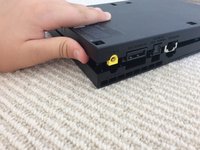
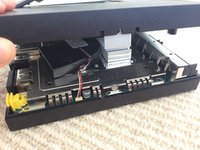
    5. Sony Playstation 2 SCPH-79002 - Fan Replacement, Take off the back: step 5, image 1 of 2 Sony Playstation 2 SCPH-79002 - Fan Replacement, Take off the back: step 5, image 2 of 2
      • Once you've done that, take off the back of the console.

      Ask FixBot

      Add Comment

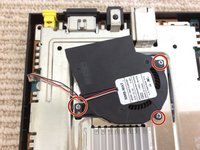
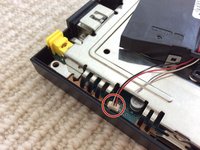
    6. Sony Playstation 2 SCPH-79002 - Fan Replacement, Take off the fan: step 6, image 1 of 2 Sony Playstation 2 SCPH-79002 - Fan Replacement, Take off the fan: step 6, image 2 of 2
      Tool used on this step:
      Tweezers
      $4.99
      Buy
      • There are 3 screws that you need to unscrew, then you need to get a pair of tweezers and use a strong pull up.

      Ask FixBot

      Add Comment

Conclusion

To reassemble your device, follow these instructions in reverse order.

Cancel: I did not complete this guide.

7 other people completed this guide.

Zach luc

Member since: 10/17/15

647 Reputation

4 Guides authored

0 Guide Comments

Add Comment

View Statistics:

Past 24 Hours: 9

Past 7 Days: 30

Past 30 Days: 110

All Time: 3,588