
Sony PS-LX300USB Dust Cover Replacement

Last updated on Jan 3, 2018
Views: 3.3K
View statistics:
- Past 24 Hours:
- 4
- Past 7 Days:
- 32
- Past 30 Days:
- 122
- All Time:
- 3,320
Comments: 0
No one has left comments on this guide. Will you be first?
Go to guide commentsCompleted: 0 1
No one has marked this guide "completed." Will you be the first?
1 person has marked this guide "completed." It's you — great job!
Favorites: 1 2
1 person has favorited (and subscribed to) this guide. Will you be next?
2 people have favorited (and subscribed to) this guide — including you!
Introduction
Go to step 1 ↓The dust cover is one of the key components of a PS-LX300USB Turntable. The dustcover keeps all of the fragile components safe from dust and other potential hazards. The repair is relatively easy and can be important in maintaining your turn table.
What you need
Tools

-
-
-
Begin by releasing the left latch. Apply downward pressure to the square, black button using a flathead screw driver.
-
Once the latch is released, lift upward.
-
Use your left hand to hold the left side of the dust cover above the latch. This ensures the latch does not reconnect.
-
-
-
Use a flat head screw driver to apply pressure to the black square button on the right side.
-
-
-
-
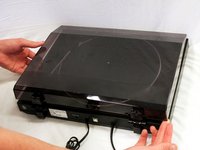
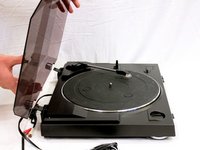
Once both the right and left buttons are released, pull the dust cover upwards.
-
The dust cover is now disconnected and ready for replacement.
-

 Ask FixBot


To reassemble your device, follow these instructions in reverse order.

Team

Cal Poly, Team S8-G3, Banghart Fall 2017 Member of Cal Poly, Team S8-G3, Banghart Fall 2017
CPSU-BANGHART-F17S8G3
5 Members
60 Guides authored
