Free Shipping on Domestic Orders $75+

Sony M-430 Microcassette-Corder Back Cover Replacement

What you need

    1. Sony M-430 Microcassette-Corder Back Cover Replacement, Battery: step 1, image 1 of 1
      • Find the arrow on the battery cover on the back of the device.

      • While pressing down on the arrow, slide the cover towards the bottom of the recorder until it clicks.

      Ask FixBot

      Add Comment

    2. Sony M-430 Microcassette-Corder Back Cover Replacement: step 2, image 1 of 2 Sony M-430 Microcassette-Corder Back Cover Replacement: step 2, image 2 of 2
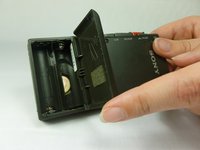
      • Lift the cover and remove the batteries.

      Ask FixBot

      Add Comment

    1. Sony M-430 Microcassette-Corder Back Cover Replacement, Back Cover: step 3, image 1 of 2 Sony M-430 Microcassette-Corder Back Cover Replacement, Back Cover: step 3, image 2 of 2
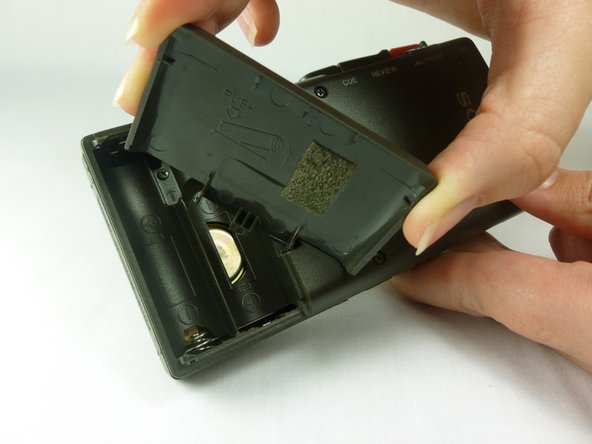
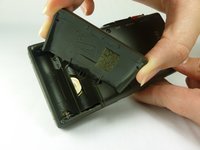
      • Remove the battery cover by first tilting it so it is at a right angle with the rest of the device.

      • Next, twist it to the side as shown in the second picture. The lid should simply snap off.

      • Potential for device damage: be careful not to apply too much force, as the lid may break.

      Ask FixBot

      Add Comment

    2. Sony M-430 Microcassette-Corder Back Cover Replacement: step 4, image 1 of 2 Sony M-430 Microcassette-Corder Back Cover Replacement: step 4, image 2 of 2
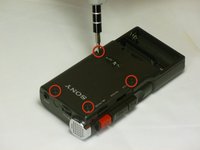
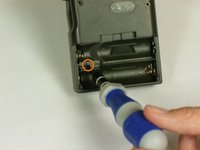
      • Use a #00 Phillips head screwdriver to remove the four (1.7x16 mm) screws from the back case.

      • Next, use the same screwdriver to unscrew the (1.7X5 mm) screw, which is located inside the battery compartment.

      Ask FixBot

      Add Comment

    3. Sony M-430 Microcassette-Corder Back Cover Replacement: step 5, image 1 of 1
      • Use a spudger to push in the two tabs located on the bottom of the device.

      • It works best to push the tabs at an upward angle (towards the top of the battery compartment). It may take a decent amount of force in order to push in the tabs.

      Ask FixBot

      Add Comment

    4. Sony M-430 Microcassette-Corder Back Cover Replacement: step 6, image 1 of 1
      • With a firm grip on the larger half, remove the back cover by lifting first on the battery area.

      • The back cover should lift cleanly off.

      Ask FixBot

      Add Comment

Conclusion

To reassemble your device, follow these instructions in reverse order.

Cancel: I did not complete this guide.

One other person completed this guide.

Matt Teare

Member since: 01/20/12

35 Reputation

3 Guides authored

Team

Cal Poly, Team 10-34, Amido Winter 2012 Member of Cal Poly, Team 10-34, Amido Winter 2012

CPSU-AMIDO-W12S10G34

4 Members

84 Guides authored

0 Guide Comments

Add Comment

View Statistics:

Past 24 Hours: 4

Past 7 Days: 12

Past 30 Days: 40

All Time: 2,727