Free Shipping on Domestic Orders $75+

Sony Ericsson z300 Microphone Replacement

What you need

  1. Sony Ericsson z300 Microphone Replacement, Back Phone Cover: step 1, image 1 of 1
    • To remove the back cover, use your thumb to press down on the center of case and slide it off.

    Ask FixBot

    Add Comment

  2. Sony Ericsson z300 Microphone Replacement, Battery: step 2, image 1 of 1
    • Using a fingernail lift the battery out of the phone.

    Ask FixBot

    Add Comment

  3. Sony Ericsson z300 Microphone Replacement, Sim Card: step 3, image 1 of 1
    • Slide the sim card out with your thumb.

    Ask FixBot

    Add Comment

  4. Sony Ericsson z300 Microphone Replacement, Back Dark Grey Case: step 4, image 1 of 1
    • To remove the back case first remove the four screws shown with a T5 Torx screwdriver

    Ask FixBot

    Add Comment

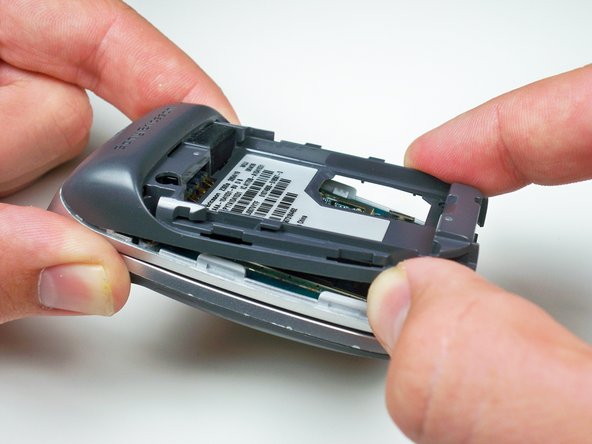
  5. Sony Ericsson z300 Microphone Replacement: step 5, image 1 of 1
    • Using your fingernail lift up the side of the casing around the bottom of the phone to release all five of the clips.

    Ask FixBot

    Add Comment

  6. Sony Ericsson z300 Microphone Replacement: step 6, image 1 of 1
    • Lift up towards the bottom and slide the case off.

    Ask FixBot

    Add Comment

  7. Sony Ericsson z300 Microphone Replacement, Motherboard: step 7, image 1 of 1
    • Use a plastic opening tool to lift up the brass colored panel.

    Ask FixBot

    Add Comment

  8. Sony Ericsson z300 Microphone Replacement: step 8, image 1 of 1
    • Flip up the yellow tab using a plastic opening tool to disconnect the motherboard from the phone body.

    Ask FixBot

    Add Comment

  9. Sony Ericsson z300 Microphone Replacement: step 9, image 1 of 1
    • Work the plastic opening tool around the edges of the motherboard to release it from the clips.

    Ask FixBot

    Add Comment

  10. Sony Ericsson z300 Microphone Replacement, Keypad: step 10, image 1 of 1
    • Using a plastic opening tool lift up the keypad to remove it.

    Ask FixBot

    Add Comment

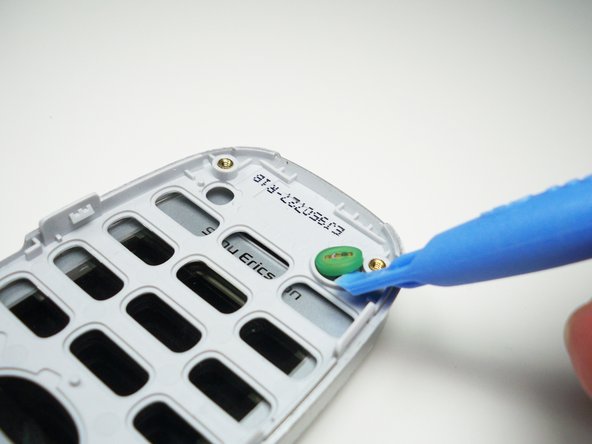
  11. Sony Ericsson z300 Microphone Replacement, Microphone: step 11, image 1 of 1
    • Use a plastic opening tool to lift the microphone out of its circular slot.

    Ask FixBot

    Add Comment

Conclusion

To reassemble your device, follow these instructions in reverse order.

Cancel: I did not complete this guide.

Alex Serventi

Member since: 10/07/10

65 Reputation

13 Guides authored

Team

Cal Poly, Team 5-15, Maness Fall 2010 Member of Cal Poly, Team 5-15, Maness Fall 2010

CPSU-MANESS-F10S5G15

4 Members

39 Guides authored

0 Guide Comments

Add Comment

View Statistics:

Past 24 Hours: 0

Past 7 Days: 2

Past 30 Days: 14

All Time: 2,184