Free Shipping on Domestic Orders $75+

Sony Ericsson s710a Main Interface Buttons Replacement

What you need

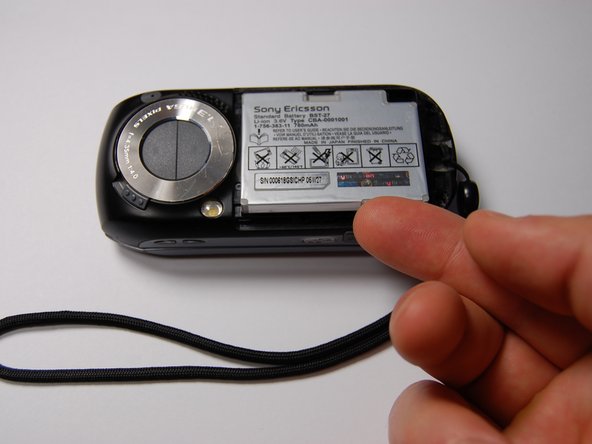
  1. Sony Ericsson s710a Main Interface Buttons Replacement, Battery: step 1, image 1 of 1
    • Remove the back cover by sliding it off.

    Ask FixBot

    Add Comment

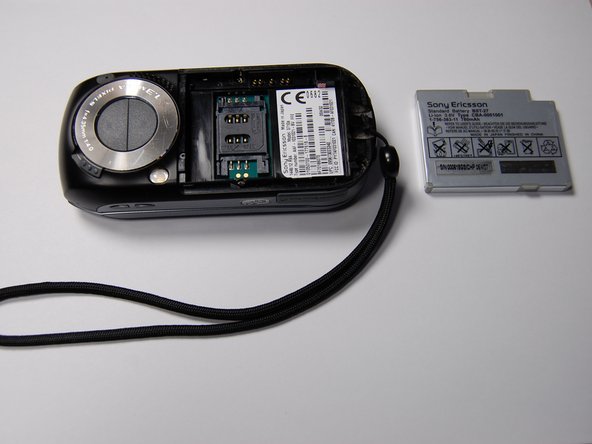
  2. Sony Ericsson s710a Main Interface Buttons Replacement: step 2, image 1 of 1
    • Pull the battery out using your finger.

    Ask FixBot

    Add Comment

  3. Sony Ericsson s710a Main Interface Buttons Replacement: step 3, image 1 of 1
    • The battery can now be replaced.

    • The battery is a 780 mAh rechargeable Lithium Ion battery.

    Ask FixBot

    Add Comment

  4. Sony Ericsson s710a Main Interface Buttons Replacement, LCD Screen: step 4, image 1 of 1
    • Remove the four 6 mm screws from beneath the battery using a Phillips #00 screwdriver.

    Ask FixBot

    Add Comment

  5. Sony Ericsson s710a Main Interface Buttons Replacement: step 5, image 1 of 1
    • Remove the microphone cover using the iFixit opening tool.

    Ask FixBot

    Add Comment

  6. Sony Ericsson s710a Main Interface Buttons Replacement: step 6, image 1 of 1
    • Remove the two 6 mm screws from the front of the phone beneath the microphone cover using a Phillips #00 screwdriver.

    Ask FixBot

    Add Comment

  7. Sony Ericsson s710a Main Interface Buttons Replacement: step 7, image 1 of 1
    • Remove the black plastic piece on the side.

    • This will allow for easier access while prying the motherboard.

    Ask FixBot

    Add Comment

  8. Sony Ericsson s710a Main Interface Buttons Replacement: step 8, image 1 of 1
    • Use the iFixit opening tool to loosen the motherboard from the phone.

    Ask FixBot

    Add Comment

  9. Sony Ericsson s710a Main Interface Buttons Replacement: step 9, image 1 of 1
    • Lift the motherboard out with your fingers.

    • Pull slowly. This will require some force.

    Ask FixBot

    Add Comment

  10. Sony Ericsson s710a Main Interface Buttons Replacement: step 10, image 1 of 1
    • Remove the two cable connectors using the iFixit opening tool.

    • Mark the orientation and port of each cable before detaching them. The connectors are symmetrical, so this is essential for reassembly.

    Ask FixBot

    Add Comment

  11. Sony Ericsson s710a Main Interface Buttons Replacement: step 11, image 1 of 1
    • On the rotational assembly remove the following screws:

    • Four 3 mm screws

    • Two 2.3 mm screws

    • Lift the rotational assembly off of the phone to allow access to the other half of the device.

    Ask FixBot

    Add Comment

  12. Sony Ericsson s710a Main Interface Buttons Replacement: step 12, image 1 of 1
    • Detach the cable connectors on the other end of the cables using a plastic opening tool.

    • Record the orientation and location of each connector for reassembly.

    Ask FixBot

    Add Comment

  13. Sony Ericsson s710a Main Interface Buttons Replacement: step 13, image 1 of 1
    • Remove the plastic cover on the back of the phone using an iFixit opening tool.

    • Remove the four 6 mm screws using a Phillips #00 screwdriver.

    Ask FixBot

    Add Comment

  14. Sony Ericsson s710a Main Interface Buttons Replacement: step 14, image 1 of 1
    • Pry the screen assembly from the main case using the iFixit opening tool.

    Ask FixBot

    Add Comment

  15. Sony Ericsson s710a Main Interface Buttons Replacement: step 15, image 1 of 1
    • With the face plate and LCD screen exposed, replace the existing LCD screen with a new LCD screen.

    • Be sure to test and make sure the detachable connections are arranged correctly.

    Ask FixBot

    Add Comment

  16. Sony Ericsson s710a Main Interface Buttons Replacement, Main Interface Buttons: step 16, image 1 of 1
    • Remove the button and pad assembly as shown.

    • If desired, these items can now be cleaned or replaced.

    Ask FixBot

    Add Comment

Conclusion

To reassemble your device, follow these instructions in reverse order.

Cancel: I did not complete this guide.

Alexander

Member since: 10/29/11

75 Reputation

4 Guides authored

0 Guide Comments

Add Comment

View Statistics:

Past 24 Hours: 1

Past 7 Days: 5

Past 30 Days: 29

All Time: 1,321