Free Shipping on Domestic Orders $75+

Sony Ericsson Xperia X10 Camera Replacement

What you need

  1. Sony Ericsson Xperia X10 Camera Replacement, Camera: step 1, image 1 of 2 Sony Ericsson Xperia X10 Camera Replacement, Camera: step 1, image 2 of 2
    • To access the internal components, such as the camera, we need to flip the phone with the screen facing down. Once this is done remove the battery.

    Ask FixBot

    Add Comment

  2. Sony Ericsson Xperia X10 Camera Replacement: step 2, image 1 of 1
    • Remove eight 5mm screws as shown in the image. Use a T-6 bit.

    Ask FixBot

    Add Comment

  3. Sony Ericsson Xperia X10 Camera Replacement: step 3, image 1 of 1
    • Using a case opener, start on the bottom right side of the phone and undo clips located at the interior sides. Repeat this step for the left side.

    Ask FixBot

    Add Comment

  4. Sony Ericsson Xperia X10 Camera Replacement: step 4, image 1 of 1
    • Once the clips are undone the back casing should dislocate and reveal the internal components of the phone. Camera location is identified on the image.

    Ask FixBot

    Add Comment

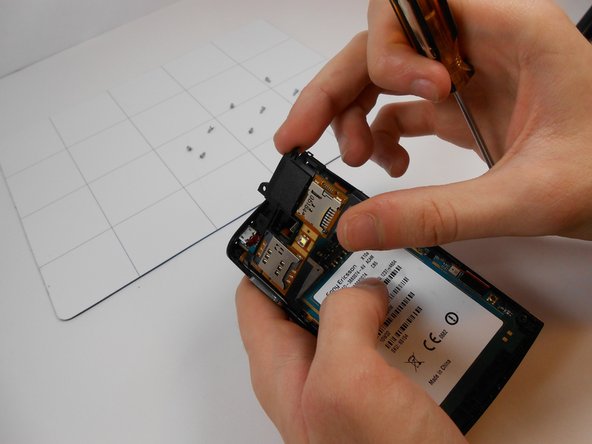
  5. Sony Ericsson Xperia X10 Camera Replacement: step 5, image 1 of 3 Sony Ericsson Xperia X10 Camera Replacement: step 5, image 2 of 3 Sony Ericsson Xperia X10 Camera Replacement: step 5, image 3 of 3
    • To remove the internal case surrounding the camera, apply pressure on the left side of internal casing and using a flat head screw driver unlatch both clips on the right side of casing. Once lifted detach ribbon cable with flat head screwdriver.

    Ask FixBot

    Add Comment

  6. Sony Ericsson Xperia X10 Camera Replacement: step 6, image 1 of 2 Sony Ericsson Xperia X10 Camera Replacement: step 6, image 2 of 2
    • Once the interior casing is removed, dislocate the hardware by unlatching clip at shown location.

    Ask FixBot

    Add Comment

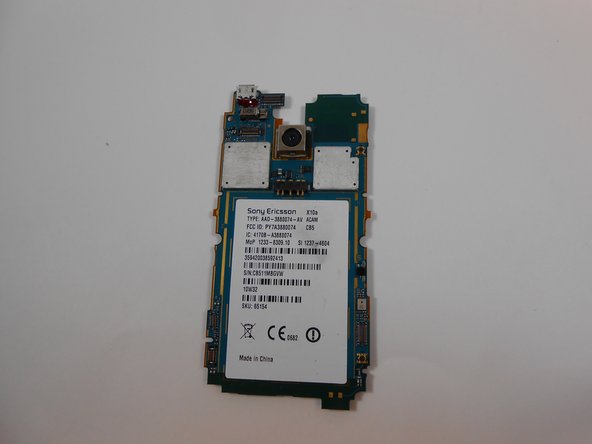
  7. Sony Ericsson Xperia X10 Camera Replacement: step 7, image 1 of 1
    • To remove damaged camera flip hardware so the lens of the camera is facing downwards and remove ribbon cable connecting camera to hardware.

    Ask FixBot

    Add Comment

  8. Sony Ericsson Xperia X10 Camera Replacement: step 8, image 1 of 1
    • Once camera is removed, insert new functional camera part and reassemble

    Ask FixBot

    Add Comment

Conclusion

To reassemble your device, follow these instructions in reverse order.

Cancel: I did not complete this guide.

2 other people completed this guide.

Bryan

Member since: 11/03/13

410 Reputation

3 Guides authored

0 Guide Comments

Add Comment

View Statistics:

Past 24 Hours: 0

Past 7 Days: 8

Past 30 Days: 30

All Time: 1,085