
Sony Ericsson W200i Keypad Replacement

Nestor Trevino and 4 other contributors
Last updated on Feb 19, 2016
Views: 6.1K
View statistics:
- Past 24 Hours:
- 1
- Past 7 Days:
- 16
- Past 30 Days:
- 104
- All Time:
- 6,130
Comments: 2
1 comment on steps, 1 guide comment.
Go to guide commentsCompleted: 6 7
6 people have marked this guide "completed." Will you be next?
7 people have marked this guide "completed." Including you — great job!
Favorites: 1 2
1 person has favorited (and subscribed to) this guide. Will you be next?
2 people have favorited (and subscribed to) this guide — including you!
Introduction
Go to step 1 ↓Replacing the keypad requires that the front case be removed.
What you need
Parts
-
Keypad (Sony Ericsson W200i keypad)
http://www.dinodirect.com/Sony-Ericsson-W200-Keypad-Black.html
Tools


-
-
-
Slide the battery cover up and off the phone.
 Ask FixBot
-
-
-
-
-
Insert the plastic opening tool in between the front case and the back case.
-
Apply downward pressure to make the case lift upwards, thus popping the front case off.
-
-
-
-
-
-
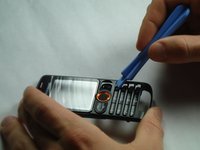
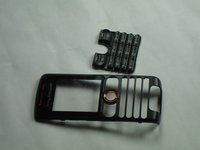
Using the plastic opening tool, press down anywhere on the keypad to separate it from the front case.
-
-


To reassemble your device, follow these instructions in reverse order.
Cancel: I did not complete this guide.
6 other people completed this guide.

Team

Cal Poly, Team 14-10, Forte Winter 2011 Member of Cal Poly, Team 14-10, Forte Winter 2011
CPSU-FORTE-W11S14G10
5 Members
96 Guides authored
1 Guide Comment
Can you guys tell me where i do get parts for these legacy phones?My jostick died on this phone.Not working at all i only can use the keypad.
