Free Shipping on Domestic Orders $75+

Sony Ericsson K750i LCD Screen Replacement

What you need

  1. Sony Ericsson K750i LCD Screen Replacement, Battery Cover: step 1, image 1 of 1
    • Remove the battery cover.

    • Press down firmly with your thumb and slide the cover back.

    Ask FixBot

    Add Comment

  2. Sony Ericsson K750i LCD Screen Replacement, Back Casing: step 2, image 1 of 1
    • Remove two Phillips #0 screws from the battery chamber.

    • Remove two Torx T6 screws from the battery chamber.

    Ask FixBot

    Add Comment

  3. Sony Ericsson K750i LCD Screen Replacement: step 3, image 1 of 1
    • Gently pry off the back casing.

    • Work an opening tool around the entire seam before attempting to pull off the casing. This action will reduce the chance of cracking the casing.

    Ask FixBot

    Add Comment

  4. Sony Ericsson K750i LCD Screen Replacement: step 4, image 1 of 1
    • Remove the casing to expose the camera's components.

    Ask FixBot

    Add Comment

  5. Sony Ericsson K750i LCD Screen Replacement, Keypad: step 5, image 1 of 1
    • Gently pry open the front casing by working an opening tool along the entire seam.

    Ask FixBot

    Add Comment

  6. Sony Ericsson K750i LCD Screen Replacement: step 6, image 1 of 1
    • Remove the front casing by gently lifting it from the phone.

    • Be careful not to pull off any other delicate pieces.

    Ask FixBot

    Add Comment

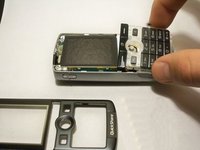
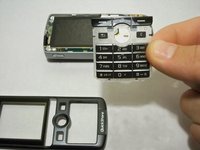
  7. Sony Ericsson K750i LCD Screen Replacement: step 7, image 1 of 2 Sony Ericsson K750i LCD Screen Replacement: step 7, image 2 of 2
    • Remove the keypad.

    • The LCD screen is very fragile. Be careful not to catch the keypad on it while removing.

    Ask FixBot

    Add Comment

  8. Sony Ericsson K750i LCD Screen Replacement, LCD Screen: step 8, image 1 of 1
    • Remove the screws holding the screen in place.

    Ask FixBot

    Add Comment

  9. Sony Ericsson K750i LCD Screen Replacement: step 9, image 1 of 1
    • Gently lift the base of the keypad to remove it.

    Ask FixBot

    Add Comment

  10. Sony Ericsson K750i LCD Screen Replacement: step 10, image 1 of 1
    • Gently pull up the green film, avoiding the joystick.

    • The LCD screen will be attached to this film and come off with it.

    Ask FixBot

    Add Comment

Conclusion

To reassemble your device, follow these instructions in reverse order.

Cancel: I did not complete this guide.

One other person completed this guide.

Abby Evers

Member since: 10/04/11

207 Reputation

6 Guides authored

Team

UW Stout, Team 1-6, Zhou Fall 2011 Member of UW Stout, Team 1-6, Zhou Fall 2011

UWSTOUT-ZHOU-F11S1G6

4 Members

18 Guides authored

1 Guide Comment

Works perfectly, thank you guys!

Aurelien - Reply Share

Add Comment

View Statistics:

Past 24 Hours: 1

Past 7 Days: 6

Past 30 Days: 27

All Time: 4,479