Introduction
This guide will examine some of the common problems related to volume issues involved with microphone recordings.
-
-
-
Often when using the recording range of 90 degrees, a low recording occurs. This particular setting seems tailored towards a much louder object, such as a musical instrument, etc.
-
To change this setting, change switch to the 120 degree recording range.
 Ask FixBot
-
-
-
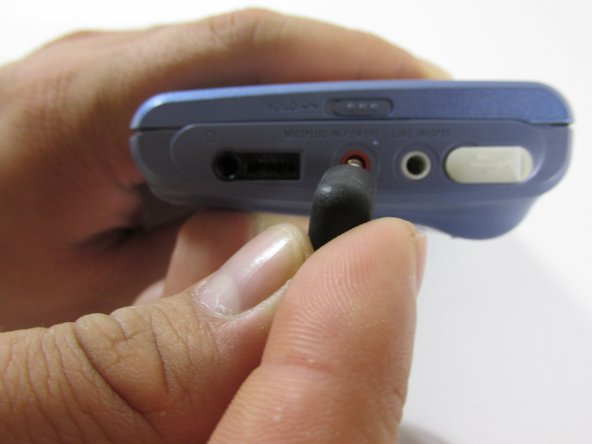
Another problem involves the stereo jack of the microphone being inserted into the wrong output of the external device.
-
-
-
-
In this particular external device, the Sony MiniDisc player, the microphone stereo jack can mistakenly be inserted into the laptop, or "white" input.
-
Always remember to insert stereo jack into the microplug, or "red" input.
-
-
-
Some volume issues could be related to other external devices, such as a laptop. This particular microphone was not designed to be used with a computer.
-
-
-
One solution is to use a device such as a USB soundcard, which can be purchased online or at most electronics stores.
-
Simply insert soundcard into a USB input in the laptop
-
Insert stereo jack of microphone into the soundcard input marked with the "microphone" symbol.
-
-




To reassemble your device, follow these instructions in reverse order.
Cancel: I did not complete this guide.
One other person completed this guide.

Team

New Mexico State, Team 1-2, Sheppard Spring 2014 Member of New Mexico State, Team 1-2, Sheppard Spring 2014
NMSU-SHEPPARD-S14S1G2
3 Members
60 Guides authored
