Free Shipping on Domestic Orders $75+

Sony DualSense Controller Middle Trim Replacement

What you need

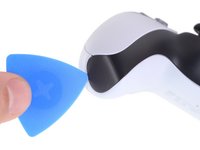
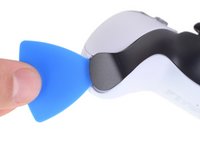
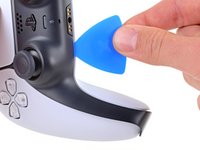
  1. Sony DualSense Controller Middle Trim Replacement, Unclip the right end of the middle trim: step 1, image 1 of 2 Sony DualSense Controller Middle Trim Replacement, Unclip the right end of the middle trim: step 1, image 2 of 2
    • Disconnect and power down your controller before you begin.

    • Insert an opening pick underneath the middle trim at the bottom-right corner of the controller to release the clips securing it to the case.

    Ask FixBot

    Add Comment

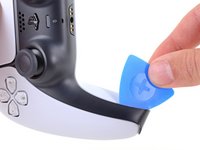
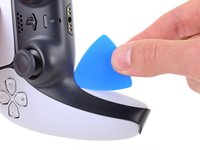
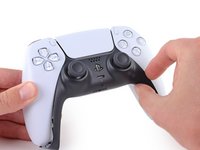
  2. Sony DualSense Controller Middle Trim Replacement, Unclip the lower-right edge of the middle trim: step 2, image 1 of 3 Sony DualSense Controller Middle Trim Replacement, Unclip the lower-right edge of the middle trim: step 2, image 2 of 3 Sony DualSense Controller Middle Trim Replacement, Unclip the lower-right edge of the middle trim: step 2, image 3 of 3
    • Slide the opening pick along the lower-right edge of the middle trim to release the clips securing it to the case.

    Ask FixBot

    Add Comment

  3. Sony DualSense Controller Middle Trim Replacement, Unclip the left end of the middle trim: step 3, image 1 of 2 Sony DualSense Controller Middle Trim Replacement, Unclip the left end of the middle trim: step 3, image 2 of 2
    • Insert an opening pick underneath the middle trim at the bottom-left corner of the controller to release the clips securing it to the case.

    Ask FixBot

    Add Comment

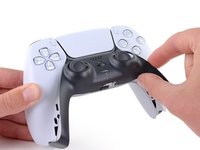
  4. Sony DualSense Controller Middle Trim Replacement, Unclip the lower-left edge of the middle trim: step 4, image 1 of 3 Sony DualSense Controller Middle Trim Replacement, Unclip the lower-left edge of the middle trim: step 4, image 2 of 3 Sony DualSense Controller Middle Trim Replacement, Unclip the lower-left edge of the middle trim: step 4, image 3 of 3
    • Slide the opening pick along the lower-left edge of the middle trim to release the clips securing it to the case.

    Ask FixBot

    Add Comment

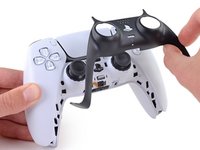
  5. Sony DualSense Controller Middle Trim Replacement, Remove the middle trim: step 5, image 1 of 3 Sony DualSense Controller Middle Trim Replacement, Remove the middle trim: step 5, image 2 of 3 Sony DualSense Controller Middle Trim Replacement, Remove the middle trim: step 5, image 3 of 3
    • Use your fingers to lift up the bottom edge of the middle trim to release the remaining clips.

    • Lift the middle trim over the joysticks to remove it.

    Ask FixBot

    Add Comment

Conclusion

To reassemble your device, follow the above steps in reverse order.

Take your e-waste to an R2 or e-Stewards certified recycler.

Repair didn’t go as planned? Try some basic troubleshooting, or ask our Answers community for help.

Cancel: I did not complete this guide.

11 other people completed this guide.

Sam Omiotek

Member since: 02/25/19

99,260 Reputation

290 Guides authored

0 Guide Comments

Add Comment

View Statistics:

Past 24 Hours: 14

Past 7 Days: 107

Past 30 Days: 423

All Time: 17,907