Free Shipping on Domestic Orders $75+

Sony DVP-SR200P DVD Reader Replacement

What you need

  1. Sony DVP-SR200P DVD Reader Replacement, Top Cover: step 1, image 1 of 2 Sony DVP-SR200P DVD Reader Replacement, Top Cover: step 1, image 2 of 2
    • Remove the five #1 Phillips screws (black, 3/16") attaching the cover to the DVD player.

    • One 3/16" screw on the right side of the DVD player.

    • One 3/16" screw on the left side of the DVD player (directly opposite of other screw).

    • Three 3/16" screws on the back of the DVD player.

    Ask FixBot

    Add Comment

  2. Sony DVP-SR200P DVD Reader Replacement: step 2, image 1 of 2 Sony DVP-SR200P DVD Reader Replacement: step 2, image 2 of 2
    • Slide the cover away from the front of the DVD player until it is off.

    Ask FixBot

    Add Comment

  3. Sony DVP-SR200P DVD Reader Replacement, Processing Board: step 3, image 1 of 1
    • Remove the blue tape from the processing board by gently pulling upward.

    Ask FixBot

    Add Comment

  4. Sony DVP-SR200P DVD Reader Replacement: step 4, image 1 of 2 Sony DVP-SR200P DVD Reader Replacement: step 4, image 2 of 2
    Tool used on this step:
    Tweezers
    $4.99
    Buy
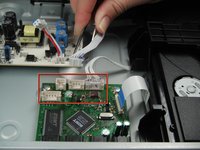
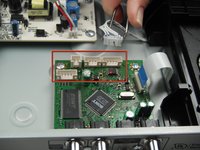
    • Use the tweezers to remove the four sets of wires connected to the processing board. Start with the cord located in front of the row of three cords.

    • The wires may be difficult to remove. Wiggling them while lifting them up may help remove them.

    Ask FixBot

    Add Comment

  5. Sony DVP-SR200P DVD Reader Replacement: step 5, image 1 of 1
    • Handle the processing board with care. It is fragile.

    • Unscrew the two #1 Phillips screws (silver, 3/16") located on the two edge corners of the processing board.

    Ask FixBot

    Add Comment

  6. Sony DVP-SR200P DVD Reader Replacement: step 6, image 1 of 1
    • Orient the DVD player so that you are facing the video and audio jacks.

    • Unscrew the two #1 Phillips screws (silver, 3/16") located on the outside of the DVD player

    • The processing board is now free to be removed and replaced.

    Ask FixBot

    Add Comment

  7. Sony DVP-SR200P DVD Reader Replacement, DVD Drive: step 7, image 1 of 1
    • Orient the DVD player so the front of the DVD player is opposite of you.

    • Remove the two #1 Phillips screws (silver, 3/16") that attach the DVD drive to the bottom of the DVD player.

    Ask FixBot

    Add Comment

  8. Sony DVP-SR200P DVD Reader Replacement: step 8, image 1 of 1
    • Remove the DVD drive by pulling it backward and upward while ensuring that it is free of any braces.

    Ask FixBot

    Add Comment

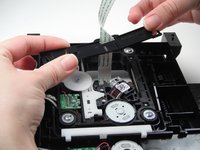
  9. Sony DVP-SR200P DVD Reader Replacement, DVD Reader: step 9, image 1 of 3 Sony DVP-SR200P DVD Reader Replacement, DVD Reader: step 9, image 2 of 3 Sony DVP-SR200P DVD Reader Replacement, DVD Reader: step 9, image 3 of 3
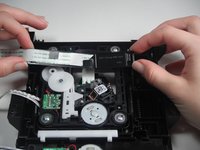
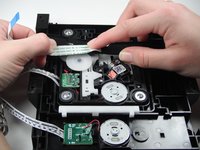
    • Flip the DVD drive upside down, to match the orientation of the first picture.

    • Carefully remove the white ribbon cable from the brace holding it in place by sliding it out towards you.

    • Next remove the brace from the DVD drive. Carefully wiggle and pull the brace upward as the white ribbon cable slides out through the brace.

    Ask FixBot

    Add Comment

  10. Sony DVP-SR200P DVD Reader Replacement: step 10, image 1 of 1
    • Remove the four silver #1 Phillips 3/16''screws to free the DVD reader from the DVD drive.

    Ask FixBot

    Add Comment

  11. Sony DVP-SR200P DVD Reader Replacement: step 11, image 1 of 1
    • Remove the DVD reader from the DVD drive by pulling it upwards off of the drive.

    • The DVD reader can now be replaced.

    Ask FixBot

    Add Comment

Conclusion

To reassemble your device, follow these instructions in reverse order.

Cancel: I did not complete this guide.

3 other people completed this guide.

Jose Coronel

Member since: 01/11/13

84 Reputation

1 Guide authored

Team

Cal Poly, Team 5-17, Forte Winter 2013 Member of Cal Poly, Team 5-17, Forte Winter 2013

CPSU-FORTE-W13S5G17

5 Members

6 Guides authored

1 Guide Comment

Which part help to play games in dvd player

WWE Final Fighters - Reply Share

Add Comment

View Statistics:

Past 24 Hours: 2

Past 7 Days: 11

Past 30 Days: 54

All Time: 5,541