
Sony DVP-NS325 Power Cable Replacement

isaiah davila and 2 other contributors
Last updated on Dec 22, 2023
Views: 437
View statistics:
- Past 24 Hours:
- 2
- Past 7 Days:
- 13
- Past 30 Days:
- 56
- All Time:
- 437
Comments: 0
No one has left comments on this guide. Will you be first?
Go to guide commentsCompleted: 1 2
1 person has marked this guide "completed." Will you be next?
2 people have marked this guide "completed." Including you — great job!
Favorites: 0 1
No one has favorited (and subscribed to) this guide. Will you be the first?
1 person has favorited (and subscribed to) this guide — and that's you!
Introduction
Go to step 1 ↓The cable is the power supply for the DVD player it is used to give power to every component and is an external cord that stays outside the DVD Player. Make sure to unplug the cable before beginning.
What you need
Tools
-
Spudger4.9


-
-
-
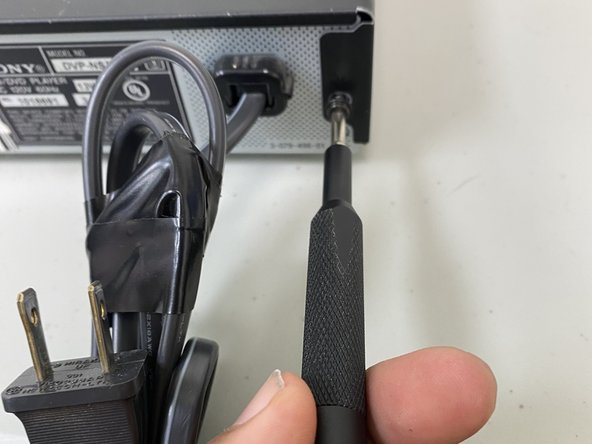
Use the Philips screwdriver to remove the screws located on the sides and the back.
-
-
-
-
Unscrew all screws using a Phillips screwdriver removing the outer case to access the power cable.
-
-
-
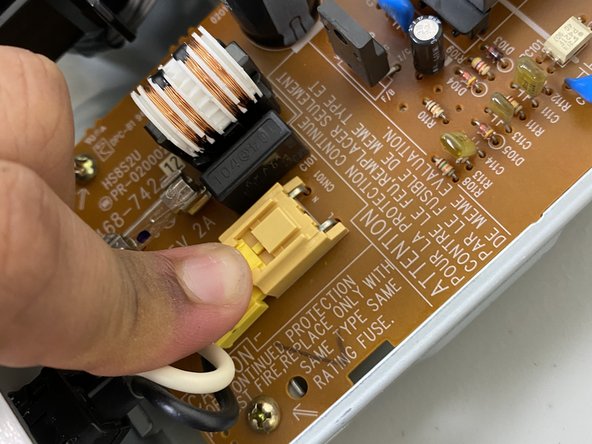
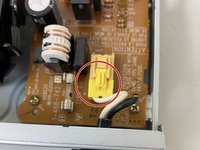
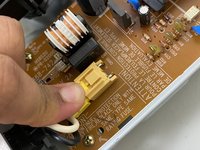
Using a finger, press down on the clip to remove the connector for the cable.
-
-
-
-
Using two fingers, press in both the top and bottom clips to release the holder for the power cable to remove the cable completely.
-
-


 Ask FixBot





To reassemble your device, follow these instructions in reverse order.
Cancel: I did not complete this guide.
One other person completed this guide.

Team

University of North Texas, Team 6-7, Kilpatrick Fall 2023 Member of University of North Texas, Team 6-7, Kilpatrick Fall 2023
UNT-KILPATRICK-F23S6G7
1 Member
48 Guides authored
