Free Shipping on Domestic Orders $75+

Sony DCR-DVD 108 Front and Back Lens Replacement

What you need

  1. Sony DCR-DVD 108 Front and Back Lens Replacement, Sony DCR-DVD 108 Case Disassembly: step 1, image 1 of 1
    • Remove all the 4.3mm screws on the bottom using a J000 Phillips screwdriver. There should be seven screws (4 silver, 2 black).

    Ask FixBot
  2. Sony DCR-DVD 108 Front and Back Lens Replacement: step 2, image 1 of 1
    • Remove the 5mm #0 Phillips screws on the underside of the LCD tuck-a-way.

    Ask FixBot
  3. Sony DCR-DVD 108 Front and Back Lens Replacement: step 3, image 1 of 1
    • Remove the 2mm #0 Phillips screw behind the battery.

    Ask FixBot
  4. Sony DCR-DVD 108 Front and Back Lens Replacement: step 4, image 1 of 1
    • Open the dvd cover and remove the 3 4.3mm phillips screws. Including ones in the corners that may be hidden.

    Ask FixBot
  5. Sony DCR-DVD 108 Front and Back Lens Replacement: step 5, image 1 of 2 Sony DCR-DVD 108 Front and Back Lens Replacement: step 5, image 2 of 2
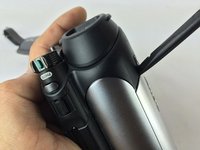
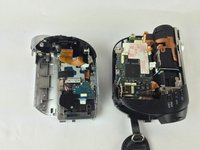
    • Once all the screws are removed you can safely pry open the camera case using a spudger.

    Ask FixBot
  6. Sony DCR-DVD 108 Front and Back Lens Replacement, Front and Back Lens: step 6, image 1 of 1
    • Take the half of camera containing both lens components and turn front portion towards you.

    • Remove the four 4.3mm Phillips #0 screws pictured.

    Ask FixBot
  7. Sony DCR-DVD 108 Front and Back Lens Replacement: step 7, image 1 of 1
    • Remove front lens and inspect for "dirt," smudges. or scratches. Use discretion, if lens appears too damaged, replace part.

    Ask FixBot
  8. Sony DCR-DVD 108 Front and Back Lens Replacement: step 8, image 1 of 1
    • Gently pull lens housing to expose housing channel.

    Ask FixBot
  9. Sony DCR-DVD 108 Front and Back Lens Replacement: step 9, image 1 of 1
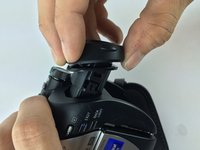
    • With the pointed end of a plastic spudger, press latch located on the side of rear lens housing.

    Ask FixBot
  10. Sony DCR-DVD 108 Front and Back Lens Replacement: step 10, image 1 of 2 Sony DCR-DVD 108 Front and Back Lens Replacement: step 10, image 2 of 2
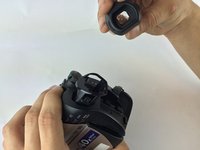
    • Once loosened gently pull and remove lens housing. The lens should now be free to inspect and replace.

    Ask FixBot
Conclusion

In order to reassemble your device, follow these instructions in reverse order.

Elijah DeWolf

Member since: 02/09/16

616 Reputation

5 Guides authored

Team

USF Tampa, Team 7-6, Cheng Spring 2016 Member of USF Tampa, Team 7-6, Cheng Spring 2016

USFT-CHENG-S16S7G6

3 Members

10 Guides authored

0 Guide Comments

Add Comment

View Statistics:

Past 24 Hours: 0

Past 7 Days: 6

Past 30 Days: 32

All Time: 714