Repair Guides
Learn how to fix just about anything with our step-by-step guides.
App
Your pocket repair helper.
FixBot
The friendly AI repair assistant.
Repairability
Learn why fixable products make sense.
Teardowns
Get a sneak peek inside the latest gadgets.
Answers Forum
Share solutions and get help from a friend.
Find Your Community
Find teams, events, and fellow fixers.
Help Out
Help make repair knowledge free and accessible for everyone.
Right to Repair
Learn about the Right to Repair movement and how to be an advocate.
Featured
Quality parts and tools backed by our lifetime guarantee.
Tools
Shop our wide selection of precision tools.
Parts
Shop parts backed by our quality guarantee.
iPhone Batteries
Batteries tested and guaranteed plus a kit with everything you need.
Free Shipping on Domestic Orders $75+
Remove battery and SD card
Unscrew six screws holding the cover.
Remove the cover
Disconnect the two ribbon cables connecting the monitor
Remove top buttons.
Be careful, this part can be easily broken.
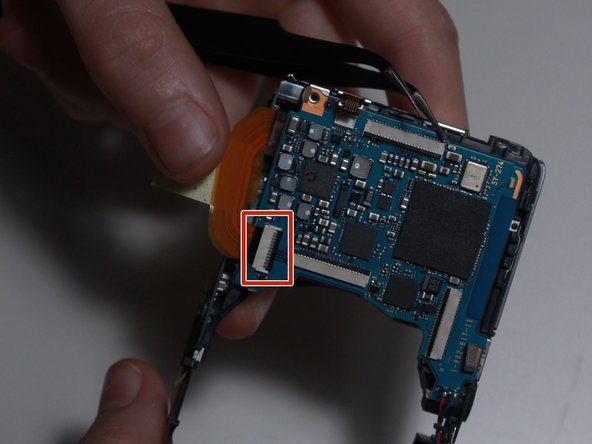
Disconnect two ribbon cables connecting the lens and sensor.
Apply a bit of force on the front of the lenses until they pop up.
Now you can safely remove them.
Disconnect ribbon cable connecting the flash with the motherboard.
and remove the flash.
Now remove the capacitor.
Lift these two pieces and slide the metal cover off.
If you want to disassemble the lens check out this guide!

Sony Cyber-shot DSC-W580 lens disassembly.
Cancel: I did not complete this guide.
with 2 other contributors
Member since: 01/13/18
241 Reputation
2 Guides authored
Badges: 2
Choose a size and copy the code below to embed this guide as a small widget on your site / forum.
Past 24 Hours: 0
Past 7 Days: 8
Past 30 Days: 35
All Time: 477