
Sony Cyber-shot DSC-W570 LCD Screen Replacement

Thomas Plummer and 5 other contributors
Last updated on Jul 2, 2025
Views: 2.5K
View statistics:
- Past 24 Hours:
- 6
- Past 7 Days:
- 25
- Past 30 Days:
- 147
- All Time:
- 2,485
Comments: 2
2 guide comments.
Go to guide commentsCompleted: 3 4
3 people have marked this guide "completed." Will you be next?
4 people have marked this guide "completed." Including you — great job!
Favorites: 0 1
No one has favorited (and subscribed to) this guide. Will you be the first?
1 person has favorited (and subscribed to) this guide — and that's you!
Missing Prerequisites
This guide is missing information on how to start the process. Make a prerequisite guide!
Better Introduction
Improve this guide by completing or revising its introduction.
Missing Details
Some of this guide's details are missing. Help users by adding tools, difficulty, or time.
Introduction
Go to step 1 ↓This is a guide to replace dead pixels, cracked screens, and malfunctioning button terminals.
What you need
Tools


-
-
-
Begin by facing the camera bottom side up to reveal the two 2.93 mm long screws
-
Remove these two screws using a Philips #00 screwdriver
 Ask FixBot
-
-
-
Turn the camera sideways on its left side making sure the two 2.93 mm long screws are facing upwards
-
Remove the two 2.93 mm long screws using a Phillips #00 screwdriver
-
-
-
Turn the camera on its right side making sure it is facing upwards
-
Remove the last two 2.93 mm long screws using a Phillips #00 screwdriver
-
-
-
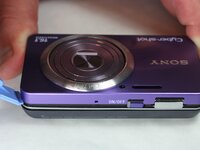
Face the device with the camera lens facing upwards
-
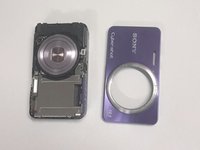
Gently pry off each corner of the cover to remove it
-
Once all corners are pried off, gently lift off the cover and place it on the side
-
-
-
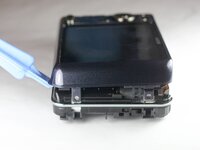
Flip the device, making sure the screen is facing upwards
-
Use the plastic opening tool to gently pry all along the corners and sides of the camera.
-
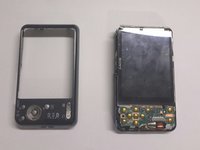
Gently lift off the entire back cover and place it on the side
-
-
-
-
-
Taking off the previous cover will reveal the two cables connecting the LCD screen to the motherboard below the screen.
-
-
-
-
Remove the LCD screen from the side opposite the battery terminals.
-
Watch carefully for the two cords mentioned in the previous step. These will still be connected.
-
The side will flip up as shown in the next step.
-
-
-
Pull these two cords straight back to disconnect them from the respective housings.
-
Caution: The housing does not need to be moved or adjusted in any way. DO NOT pull the cords at an angle, it can destroy the cords and the housing. Pull Straight Back!
-
-
-
This is what the camera should look like after 2 cords and the screen have been removed.
-
The lens cord is being held to the side for a clearer view.
-
-






To reassemble your device, follow these instructions in reverse order.
Cancel: I did not complete this guide.
3 other people completed this guide.

Team

USF Tampa, Team 9-1, Brown Winter 2015 Member of USF Tampa, Team 9-1, Brown Winter 2015
USFT-BROWN-W15S9G1
5 Members
60 Guides authored
2 Guide Comments
And the screen replacement how??
do I need glue?
