Free Shipping on Domestic Orders $75+

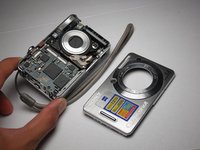
Sony Cyber-shot DSC-W55 Front Case Replacement

What you need

    1. Sony Cyber-shot DSC-W55 Front Case Replacement, Battery: step 1, image 1 of 2 Sony Cyber-shot DSC-W55 Front Case Replacement, Battery: step 1, image 2 of 2
      • Slide the battery cover in the direction the arrow points.

      • Pull the battery cover towards you.

      Ask FixBot

      Add Comment

    2. Sony Cyber-shot DSC-W55 Front Case Replacement: step 2, image 1 of 2 Sony Cyber-shot DSC-W55 Front Case Replacement: step 2, image 2 of 2
      • Flick the blue switch for the battery to pop out.

      • Remove the battery from the camera.

      Ask FixBot

      Add Comment

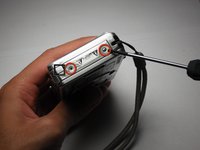
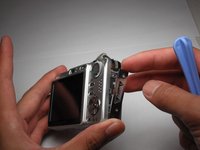
    1. Sony Cyber-shot DSC-W55 Front Case Replacement, Back Case: step 3, image 1 of 2 Sony Cyber-shot DSC-W55 Front Case Replacement, Back Case: step 3, image 2 of 2
      • Using the Phillips #00 screwdriver, remove the two screws from the caution panel.

      • Remove that panel.

      • Careful for falling pieces.

      Ask FixBot

      Add Comment

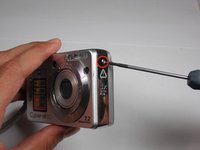
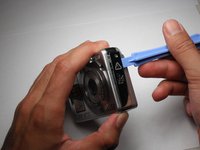
    2. Sony Cyber-shot DSC-W55 Front Case Replacement: step 4, image 1 of 2 Sony Cyber-shot DSC-W55 Front Case Replacement: step 4, image 2 of 2
      • Remove the screw with a Phillips #00 screwdriver from the left side of the camera (with '3x optical zoom' engraved on the side panel).

      • Remove the panel.

      Ask FixBot

      Add Comment

    3. Sony Cyber-shot DSC-W55 Front Case Replacement: step 5, image 1 of 1
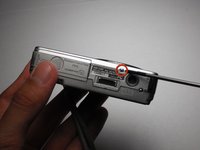
      • Remove the screw using the Phillips #00 screwdriver from the bottom of the camera, closest to the back cover.

      Ask FixBot

      Add Comment

    4. Sony Cyber-shot DSC-W55 Front Case Replacement: step 6, image 1 of 2 Sony Cyber-shot DSC-W55 Front Case Replacement: step 6, image 2 of 2
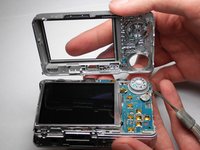
      • Gently remove the back cover.

      • It may be a bit stiff, so use some force to remove it. Proceed with caution.

      Ask FixBot

      Add Comment

    1. Sony Cyber-shot DSC-W55 Front Case Replacement, Front Case: step 7, image 1 of 1
      • Remove the screw using a Phillips #00 screwdriver on the right side (where the caution panel used to be).

      Ask FixBot

      Add Comment

    2. Sony Cyber-shot DSC-W55 Front Case Replacement: step 8, image 1 of 3 Sony Cyber-shot DSC-W55 Front Case Replacement: step 8, image 2 of 3 Sony Cyber-shot DSC-W55 Front Case Replacement: step 8, image 3 of 3
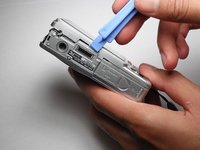
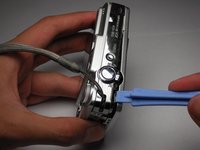
      • Remove the small screw using a Phillips #00 screwdriver on the bottom of the camera attached to the front cover.

      • Gently remove the front cover.

      • Put a little force to pop off the case. Proceed with caution.

      Ask FixBot

      Add Comment

Conclusion

To reassemble your device, follow these instructions in reverse order.

Cancel: I did not complete this guide.

2 other people completed this guide.

Andrew Carter

Member since: 10/11/10

262 Reputation

2 Guides authored

Team

Cal Poly, Team 9-20, Regan Fall 2010 Member of Cal Poly, Team 9-20, Regan Fall 2010

CPSU-REGAN-F10S9G20

5 Members

29 Guides authored

0 Guide Comments

Add Comment

View Statistics:

Past 24 Hours: 1

Past 7 Days: 10

Past 30 Days: 49

All Time: 4,186