Free Shipping on Domestic Orders $75+

Sony Cyber-shot DSC-TX7 Front Cover Replacement

What you need

    1. Sony Cyber-shot DSC-TX7 Front Cover Replacement, Battery: step 1, image 1 of 2 Sony Cyber-shot DSC-TX7 Front Cover Replacement, Battery: step 1, image 2 of 2
      • The battery compartment is located on the bottom of camera.

      • Move the slider from the 'lock' position to the 'open' position.

      Ask FixBot

      Add Comment

    2. Sony Cyber-shot DSC-TX7 Front Cover Replacement: step 2, image 1 of 3 Sony Cyber-shot DSC-TX7 Front Cover Replacement: step 2, image 2 of 3 Sony Cyber-shot DSC-TX7 Front Cover Replacement: step 2, image 3 of 3
      • Battery not shown.

      • Pull battery from compartment.

      • Insert newly charged battery into compartment, as shown in diagram (located in compartment).

      • Shut compartment door.

      • Move the slider back to the 'lock' position.

      Ask FixBot

      Add Comment

    1. Sony Cyber-shot DSC-TX7 Front Cover Replacement, Front Cover: step 3, image 1 of 1
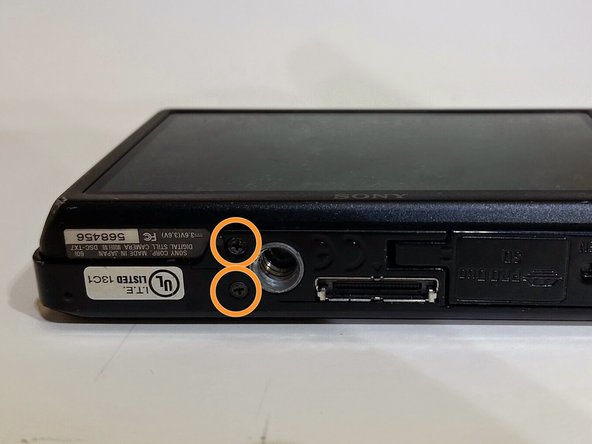
      • Use the Phillips #00 screwdriver to remove the 4mm length screws. There are 6 screws total.

      Ask FixBot

      Add Comment

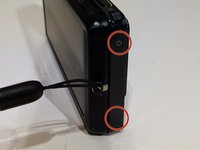
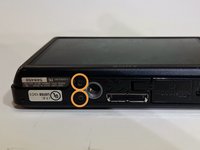
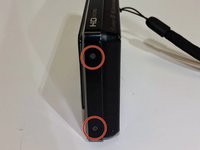
    2. Sony Cyber-shot DSC-TX7 Front Cover Replacement: step 4, image 1 of 3 Sony Cyber-shot DSC-TX7 Front Cover Replacement: step 4, image 2 of 3 Sony Cyber-shot DSC-TX7 Front Cover Replacement: step 4, image 3 of 3
      • The 4 mm length screws are located on each side and on the bottom of the camera.

      • 2 screws on each side (4 total).

      • 2 screws on bottom.

      Ask FixBot

      Add Comment

    3. Sony Cyber-shot DSC-TX7 Front Cover Replacement: step 5, image 1 of 1
      • Gently pry around the front cover using the plastic opening tool.

      • Carefully separate front cover from body of camera.

      Ask FixBot

      Add Comment

    4. Sony Cyber-shot DSC-TX7 Front Cover Replacement: step 6, image 1 of 1
      • The front cover is now removed from the camera and the internal hardware is now visible.

      • They front cover will still be connected by a ribbon. Be careful not to break the ribbon.

      Ask FixBot

      Add Comment

Conclusion

To reassemble your device, follow these instructions in reverse order.

Cancel: I did not complete this guide.

Leslie Mundell

Member since: 03/18/15

414 Reputation

4 Guides authored

Team

0 Guide Comments

Add Comment

View Statistics:

Past 24 Hours: 3

Past 7 Days: 13

Past 30 Days: 40

All Time: 752