Free Shipping on Domestic Orders $75+

Sony Cyber-shot DSC-T1 CCD Sensor Module Replacement

Views: 16K

View statistics:

Past 24 Hours:
5
Past 7 Days:
34
Past 30 Days:
189
All Time:
15,583
Comments: 1

1 guide comment.

Go to guide comments
Completed: 5

5 people have marked this guide "completed." Will you be next?

Favorites: 0

No one has favorited (and subscribed to) this guide. Will you be the first?

Time Required: 1 minute
Difficulty: Easy
Community-Contributed Guide

An awesome member of our community made this guide. It was not created by iFixit staff.

Sony Cyber-shot DSC-T1 CCD Sensor Module Replacement

Introduction

Go to step 1 ↓

Is your LCD screen acting strange? Replacing the CCD Sensor Module is a straight forward task that will increase the clarity of your screen.

What you need

Tools

  • Phillips #00 Screwdriver
    4.9
  • Spudger
    4.9
    1. Sony Cyber-shot DSC-T1 CCD Sensor Module Replacement, Battery: step 1, image 1 of 2 Sony Cyber-shot DSC-T1 CCD Sensor Module Replacement, Battery: step 1, image 2 of 2
      • Locate the battery door at the bottom of the camera.

      • Press down on the door and slide it back. The door will pop open.

      Ask FixBot

      Add Comment

    2. Sony Cyber-shot DSC-T1 CCD Sensor Module Replacement: step 2, image 1 of 1
      • Remove the battery from the door that you opened in the previous step.

      Ask FixBot

      Add Comment

    1. Sony Cyber-shot DSC-T1 CCD Sensor Module Replacement, Disassembling Sony Cyber-shot DSC-T1 Removing Front Cover: step 3, image 1 of 3 Sony Cyber-shot DSC-T1 CCD Sensor Module Replacement, Disassembling Sony Cyber-shot DSC-T1 Removing Front Cover: step 3, image 2 of 3 Sony Cyber-shot DSC-T1 CCD Sensor Module Replacement, Disassembling Sony Cyber-shot DSC-T1 Removing Front Cover: step 3, image 3 of 3
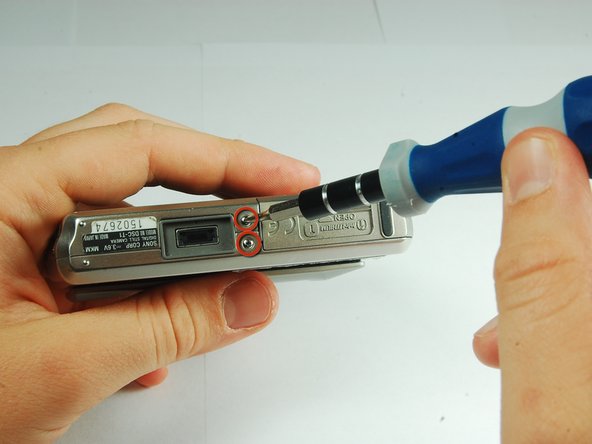
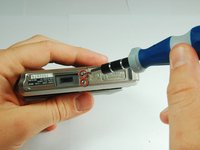
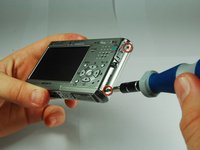
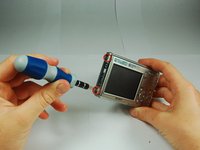
      • There are two screws on the left and right sides of the camera, and two screws on the bottom.

      • Use a PH00 screwdriver and remove the six 2.9mm screws.

      Ask FixBot

      Add Comment

    2. Sony Cyber-shot DSC-T1 CCD Sensor Module Replacement: step 4, image 1 of 2 Sony Cyber-shot DSC-T1 CCD Sensor Module Replacement: step 4, image 2 of 2
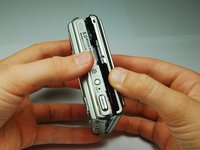
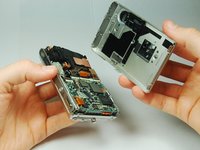
      • Use hands to gently pry the front casing away from the camera.

      Ask FixBot

      Add Comment

    1. Sony Cyber-shot DSC-T1 CCD Sensor Module Replacement, CCD Sensor Module: step 5, image 1 of 2 Sony Cyber-shot DSC-T1 CCD Sensor Module Replacement, CCD Sensor Module: step 5, image 2 of 2
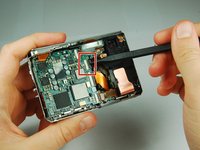
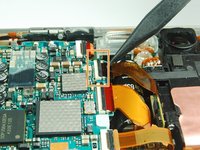
      • Use the tip of a spudger to flip up the tab on the ZIF connector securing the motherboard ribbon cable.

      • The second picture shows what these tabs look like in their open positions.

      Ask FixBot

      Add Comment

    2. Sony Cyber-shot DSC-T1 CCD Sensor Module Replacement: step 6, image 1 of 1
      • Grasp the CCD Sensor Module and remove it.

      Ask FixBot

      Add Comment

Conclusion

To reassemble your device, follow these instructions in reverse order.

Cancel: I did not complete this guide.

5 other people completed this guide.

iDeleted

Member since: 07/07/10

2,101 Reputation

39 Guides authored

1 Guide Comment

where I can buy it?

Francesco Cortese - Reply Share

Add Comment

View Statistics:

Past 24 Hours: 5

Past 7 Days: 34

Past 30 Days: 189

All Time: 15,583