Free Shipping on Domestic Orders $75+

Sony Cyber-shot DSC-P9 Top Button Replacement

Views: 1.2K

View statistics:

Past 24 Hours:
2
Past 7 Days:
7
Past 30 Days:
44
All Time:
1,189
Comments: 0

No one has left comments on this guide. Will you be first?

Go to guide comments
Completed: 0

No one has marked this guide "completed." Will you be the first?

Favorites: 1

1 person has favorited (and subscribed to) this guide. Will you be next?

Time Required: 15 - 25 minutes
Difficulty: Easy
Needs Better Images

Better photos will improve this guide. Help out by taking, editing, or uploading new ones!

Sony Cyber-shot DSC-P9 Top Button Replacement

What you need

Tools

    1. Sony Cyber-shot DSC-P9 Top Button Replacement, Battery: step 1, image 1 of 1
      • Slide the battery latch down the side of the camera with your hands.

      • The latch will automatically pop open.

      Ask FixBot

      Add Comment

    2. Sony Cyber-shot DSC-P9 Top Button Replacement: step 2, image 1 of 1
      • Unlatch the clip over the battery.

      • The battery will partially pop out.

      Ask FixBot

      Add Comment

    3. Sony Cyber-shot DSC-P9 Top Button Replacement: step 3, image 1 of 2 Sony Cyber-shot DSC-P9 Top Button Replacement: step 3, image 2 of 2
      • Remove the battery from the camera.

      Ask FixBot

      Add Comment

    1. Sony Cyber-shot DSC-P9 Top Button Replacement, Outer Casing: step 4, image 1 of 2 Sony Cyber-shot DSC-P9 Top Button Replacement, Outer Casing: step 4, image 2 of 2
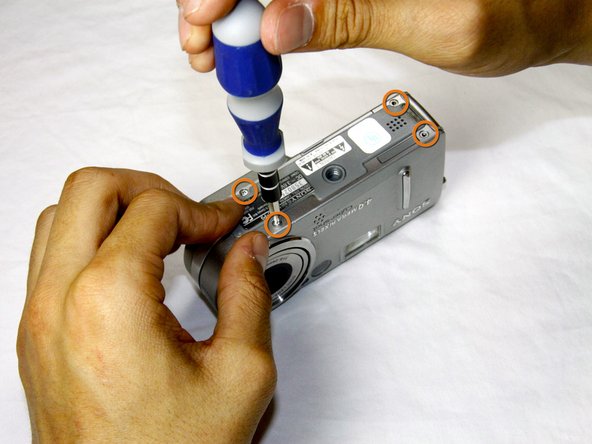
      • Remove the four 3.0mm Phillips #000 screws on the top of the camera with the phillips screwdriver.

      • Remove the additional four 3.0mm Phillips #000 screws on the bottom of the camera.

      Ask FixBot

      Add Comment

    2. Sony Cyber-shot DSC-P9 Top Button Replacement: step 5, image 1 of 2 Sony Cyber-shot DSC-P9 Top Button Replacement: step 5, image 2 of 2
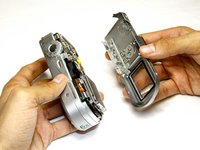
      • Once the screws are removed, slowly remove the back casing from the rest of the camera.

      Ask FixBot

      Add Comment

    3. Sony Cyber-shot DSC-P9 Top Button Replacement: step 6, image 1 of 2 Sony Cyber-shot DSC-P9 Top Button Replacement: step 6, image 2 of 2
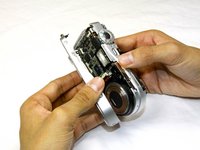
      • Then, pull the front case away from the rest of the camera.

      Ask FixBot

      Add Comment

    4. Sony Cyber-shot DSC-P9 Top Button Replacement: step 7, image 1 of 1
      • After the casing is removed, the camera should look as shown.

      Ask FixBot

      Add Comment

    1. Sony Cyber-shot DSC-P9 Top Button Replacement, Top Button: step 8, image 1 of 1
      • Remove the 3.0mm Phillips #000 screw above the battery door on the side of the camera.

      Ask FixBot

      Add Comment

    2. Sony Cyber-shot DSC-P9 Top Button Replacement: step 9, image 1 of 1
      • Pull off the pieces of casing located on either side of the top button of the camera.

      • Both of the two pieces should slide off very easily. Do not force them off.

      Ask FixBot

      Add Comment

    3. Sony Cyber-shot DSC-P9 Top Button Replacement: step 10, image 1 of 1
      • Remove the top button piece. You will need to detach a small blue ribbon cable before the button can be fully removed.

      Ask FixBot

      Add Comment

Conclusion

To reassemble your device, follow these instructions in reverse order.

Cancel: I did not complete this guide.

Andrew Forster

Member since: 04/16/12

12 Reputation

2 Guides authored

Team

Cal Poly, Team 17-25, Amido Spring 2012 Member of Cal Poly, Team 17-25, Amido Spring 2012

CPSU-AMIDO-S12S17G25

4 Members

84 Guides authored

0 Guide Comments

Add Comment

View Statistics:

Past 24 Hours: 2

Past 7 Days: 7

Past 30 Days: 44

All Time: 1,189